SpindTune is Valorant-Spind’s free Windows tool to optimize your PC: junk gone, apps and drivers up to date, hidden gaming slowdowns found and Valorant-ready. No account, no ads, no subscription – and nothing happens without your click.
Last updated: October 7, 2026
Privacy first
Lots of PC optimizer tools want an account first, show ads, push you into a subscription or run quietly in the background. SpindTune does none of that: it only acts when you click, and it never sends data about you to us.
To be completely honest: SpindTune only goes online when you start a feature that needs it – for example updates through Microsoft (winget, Windows Update), graphics drivers straight from NVIDIA or AMD, game requirements from the Steam store, the speed test via Cloudflare or the cleanup database update from GitHub. Your settings stay local in %LOCALAPPDATA%\SpindTune.
SpindTune is a free Windows tool by Valorant-Spind that lets you optimize your PC, clean it up and keep it up to date. It removes junk files without touching the registry, updates apps, Windows, antivirus and drivers, finds hidden slowdowns with the Gaming Check and uses the Valorant Check to test TPM 2.0, Secure Boot and more for Vanguard. No account, no ads, and nothing happens without your click.

A small setup wizard does it all: download SpindTune-Setup.exe, run it, confirm administrator rights – SpindTune goes into “Program Files”, the Start menu and, if you like, your desktop. On first launch you read the safety notes once, then you start straight in Simple mode.
SHA-256 of the file:
957a24a30cb13f19e76c3de62f13c74b27164cd3d6542db0d6b2a051b6388ece
Check it in PowerShell with Get-FileHash .\SpindTune-Setup.exe. The file is not digitally signed (yet), so Windows SmartScreen may show “Unknown publisher” on first launch. Only download SpindTune from valorant-spind.de.
View the VirusTotal report – as of October 7, 2026, none of the 70 antivirus engines that scanned the file reports a detection.
If you want to optimize your PC, you usually face a jungle of settings, folders and services. SpindTune turns that around. Every launch starts in Simple mode with four big cards. Each card answers a question almost every gamer has and instantly shows the result of the last check. Top right, you see your PC health as a score from 0 to 100.
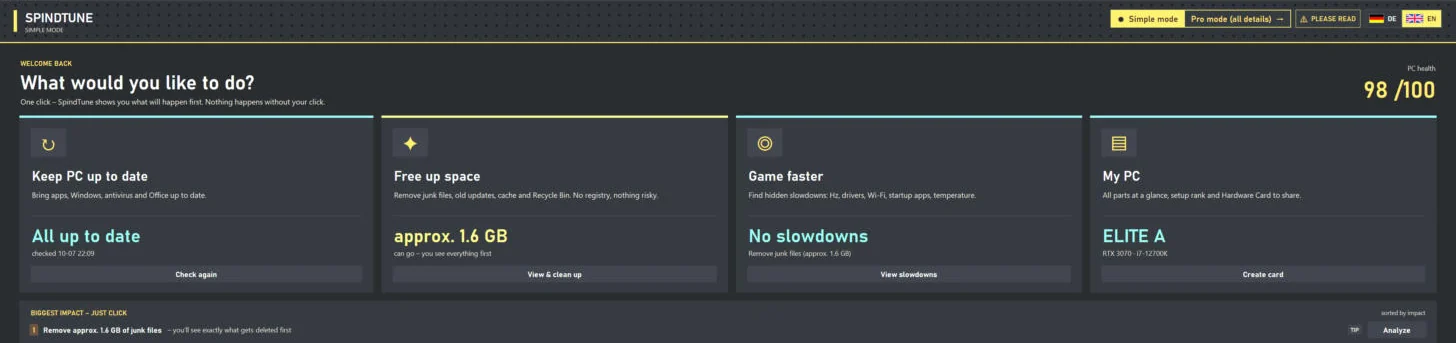
Keep PC up to date
Bring apps, Windows, antivirus and Office up to date – with a list you see and confirm first.
Free up space
Remove junk files, old update files, caches and the Recycle Bin. No registry, nothing risky – and you see everything first.
Game faster
Find hidden slowdowns: wrong refresh rate, old drivers, shaky Wi-Fi, too many startup apps, temperature.
My PC
All parts at a glance, an estimated setup tier and your Hardware Card to share.
Below, under “Biggest impact – just click”, SpindTune lists the steps that matter most on your PC – sorted by impact. One click on “Analyze” or “Show” takes you straight to the right place. If you want more control, switch to Pro mode with all the details in the top right corner.
In Pro mode you get a sidebar with ten sections: Home, Updates, Clean Up, Storage Analysis, Duplicate Files, Uninstall, Startup Apps, Gaming Check, Valorant Check and Hardware & Card. Click through the tour – every image is a real screenshot of SpindTune 3.2.0, taken on a Windows 11 gaming PC.
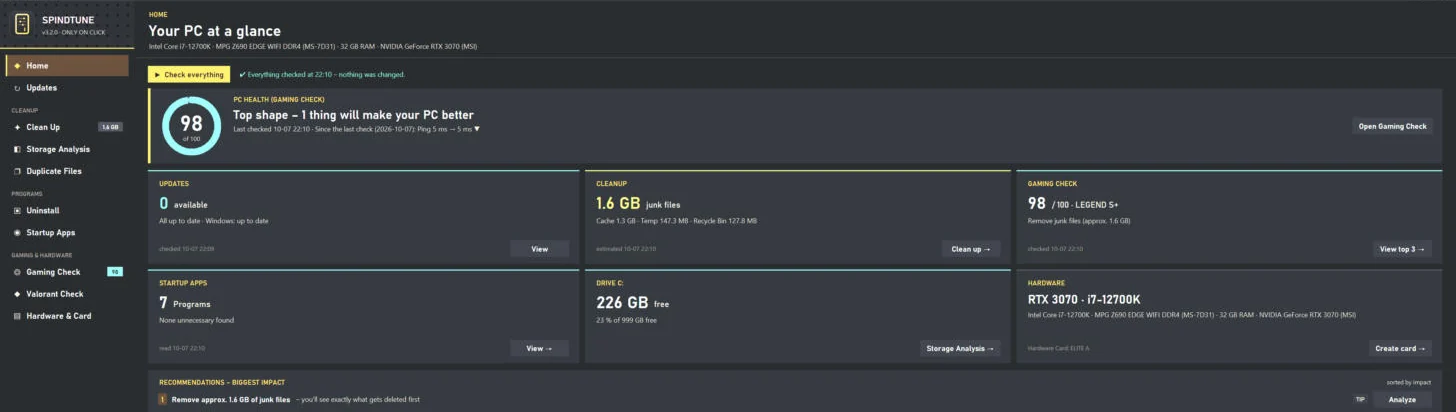
“Your PC at a glance”
One click on “Check everything” checks updates, gaming readiness, junk files and startup apps in about two to four minutes – without changing anything. Six tiles then show updates, cleanup potential, gaming score, startup apps, free space on C: and your hardware.
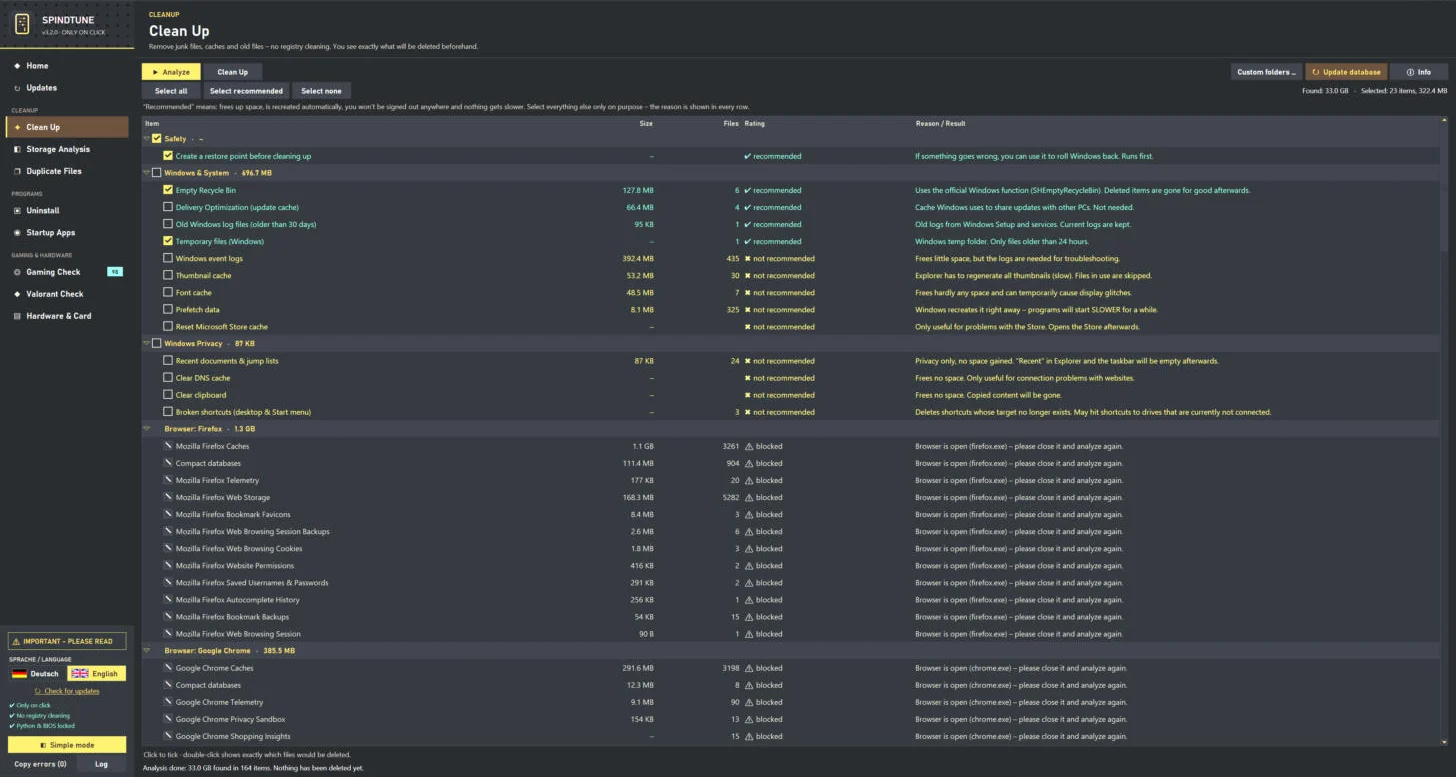
Analyze first, delete later
Every row shows size, file count, rating and a reason. If a browser is open, SpindTune automatically blocks its items – so nothing breaks while it’s running.
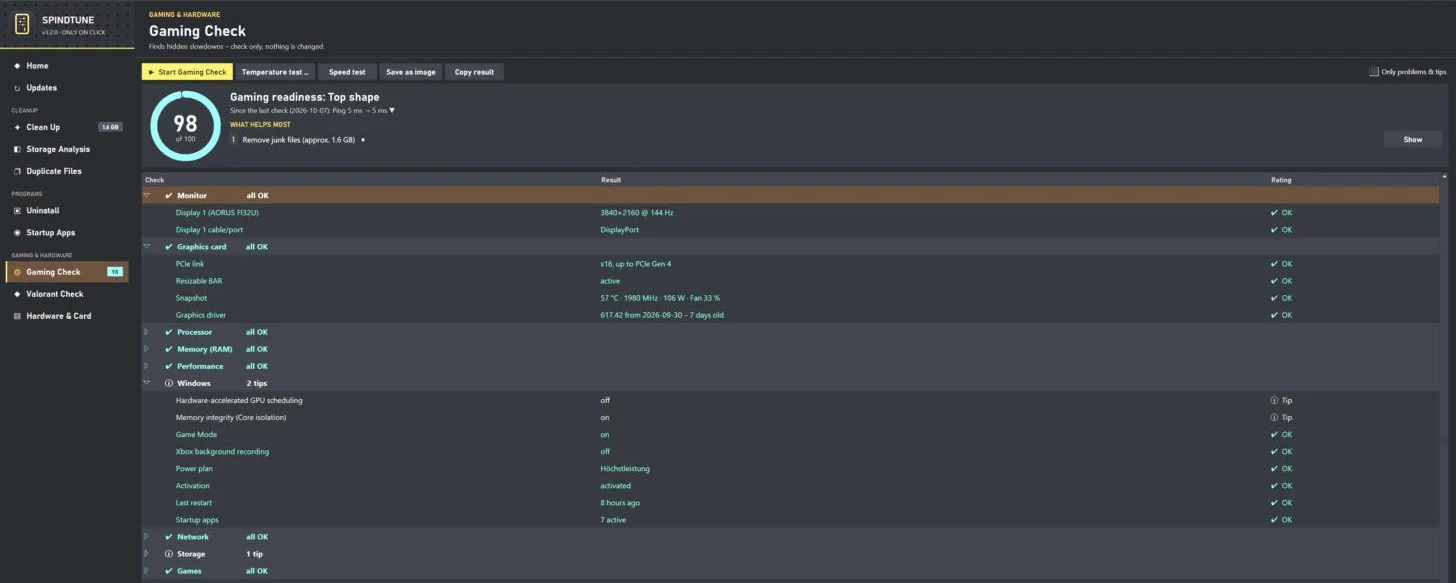
Score, top 3 and every detail
Monitor at 144 Hz over DisplayPort, graphics card on PCIe x16 with Resizable BAR, driver seven days old: the Gaming Check shows in green what’s fine and in yellow where performance is still hiding.
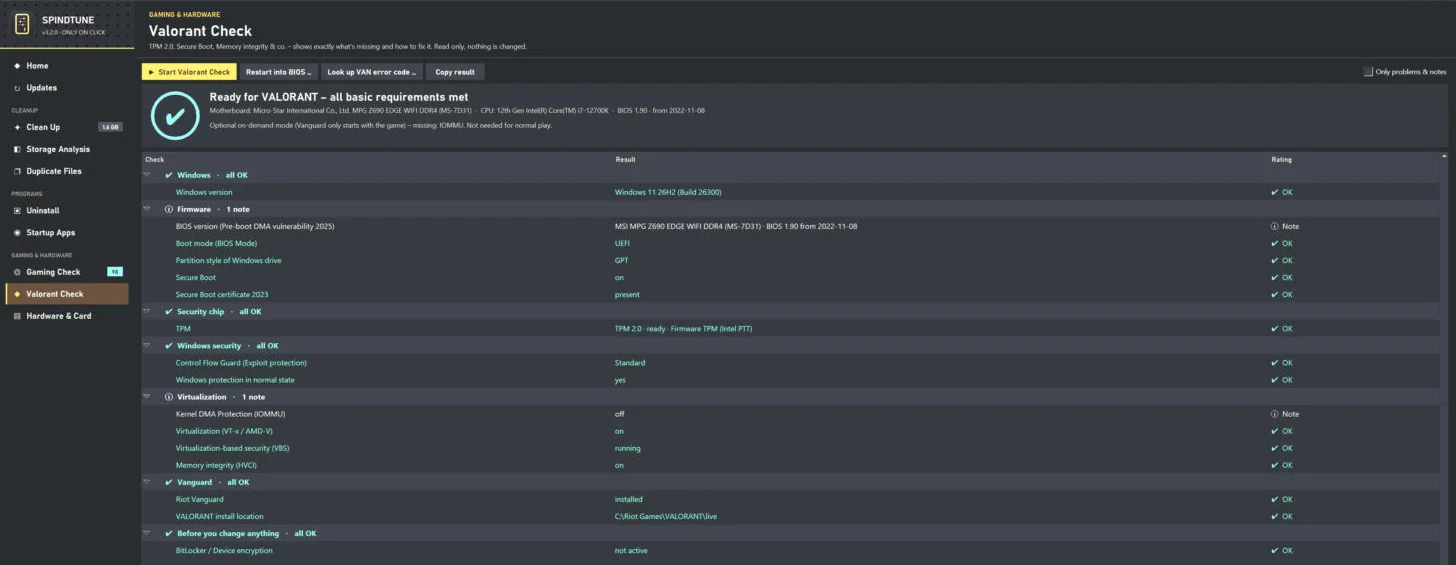
Ready for VALORANT?
TPM 2.0, Secure Boot, UEFI mode, partition style, memory integrity, Vanguard services and BitLocker checked in 10 to 30 seconds. Read only, nothing is changed.
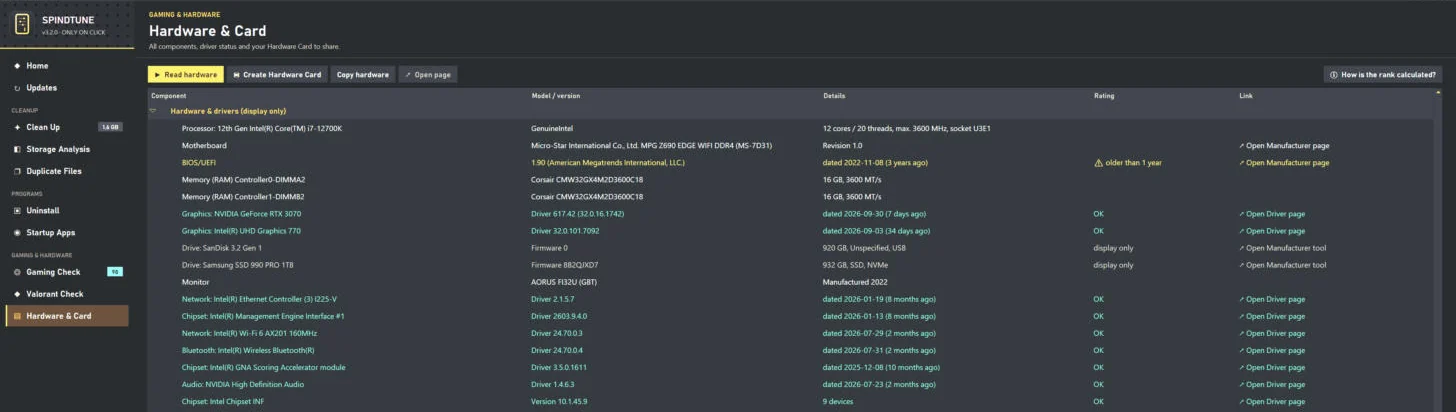
Every part, every driver
CPU, motherboard with BIOS date, RAM per slot, graphics cards, drives with firmware and all key drivers with their age. A yellow warning sign flags, for example, a BIOS older than one year.
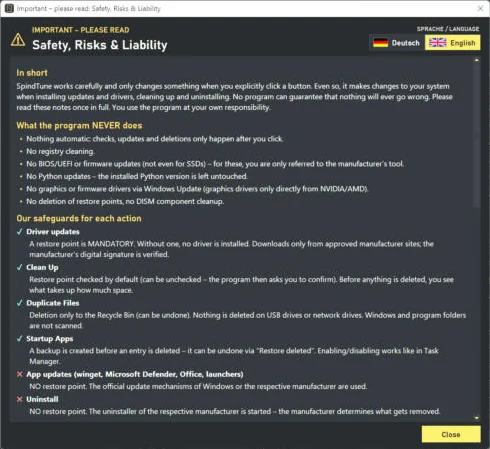
Transparency instead of fine print
On first launch and after every new version, SpindTune shows what it never does and how each action is safeguarded. It only starts once you tick the box.
Outdated apps are security holes – and outdated graphics drivers cost FPS. The Updates section checks everything that can sensibly be updated when you click, and shows you a list with installed and new versions first. Nothing gets installed until you click “Update all” or “Selected only”. The sources are always official:
Temp files, old Windows Update downloads, crash reports and browser caches pile up over months. SpindTune lets you clean up your PC – on Windows 11 too – without worrying that something will be missing afterwards. The principle is simple: analyze first, then decide.
Besides its own Windows rules, SpindTune uses the community database Winapp2 (license CC BY-SA 4.0). The current version knows more than 4,000 apps and only updates from GitHub when you click. Important: SpindTune only uses its file rules – registry rules are always skipped. Cookies, saved passwords, sessions, save games and shader caches are automatically rated “not recommended”, so you don’t accidentally get signed out everywhere.
Recommended – safely cleaned by SpindTune
Deliberately not included
On top of that, Storage Analysis helps you clean up your hard drive: it shows which folders take up the most space – as bars with percentages, sortable and display only. Duplicate Files finds identical files by checksum, always keeps at least one file per group and only moves the rest to the Recycle Bin – so everything stays reversible.
Every program that starts with Windows costs boot time and memory – and may keep running while you play. The Startup Apps section shows every entry from the registry, the startup folder and Task Scheduler. Enabling and disabling works exactly like in Task Manager. Before deleting, SpindTune makes a backup; with “Restore deleted …” you get entries back. Driver, peripheral and security software is never marked as “unnecessary”.
Under Uninstall you see all installed programs and, if you like, Store apps with version, publisher, size and install date. Uninstalling always uses each publisher’s official uninstaller – visibly, after a confirmation and without hidden tricks.
The Gaming Check is the heart of SpindTune for everyone who wants to optimize their PC for gaming. In about 30 seconds it checks twelve areas and gives you a score from 0 to 100 with a tier – from ROOKIE (D) to LEGEND (S+). On top, you get the three things that help most and a comparison with your last check. Nothing is changed.
SpindTune compares the current and maximum refresh rate and checks whether your cable and port can even handle it.
Is your RAM in the right mode, and is it running at the speed you paid for? That’s a BIOS switch, not an update.
Full PCIe link, Resizable BAR, a temperature snapshot and the age of your graphics driver.
Game Mode, hardware-accelerated GPU scheduling, Xbox background recording, power plan and startup apps – each with a button to the right setting.
20 pings to three DNS servers and your router, Wi-Fi band and signal, LAN speed and router detection – for example FRITZ!Box or Speedport.
Free space, wear, temperature and power-on hours – plus warnings about known firmware bugs in some SSDs.
More checks look at background programs and overlays, P- and E-cores on Intel hybrid CPUs, battery health on laptops and your installed games. For 17 titles – including Valorant, Fortnite, League of Legends, CS2 and Cyberpunk 2077 – SpindTune compares your hardware with the official publisher requirements, and for other Steam games live with the Steam store. This is explicitly not an FPS measurement.
Temperature test and speed test: The temperature test measures for two minutes in a game or 30 seconds under CPU load whether your graphics card gets hot or throttles and whether the CPU clock drops. Windows can’t reliably read the CPU temperature itself without extra software – and SpindTune says so openly. The speed test measures download, upload and real game ping via Cloudflare in about 25 seconds. Because up to 1–2 GB of data can be used, SpindTune asks first.
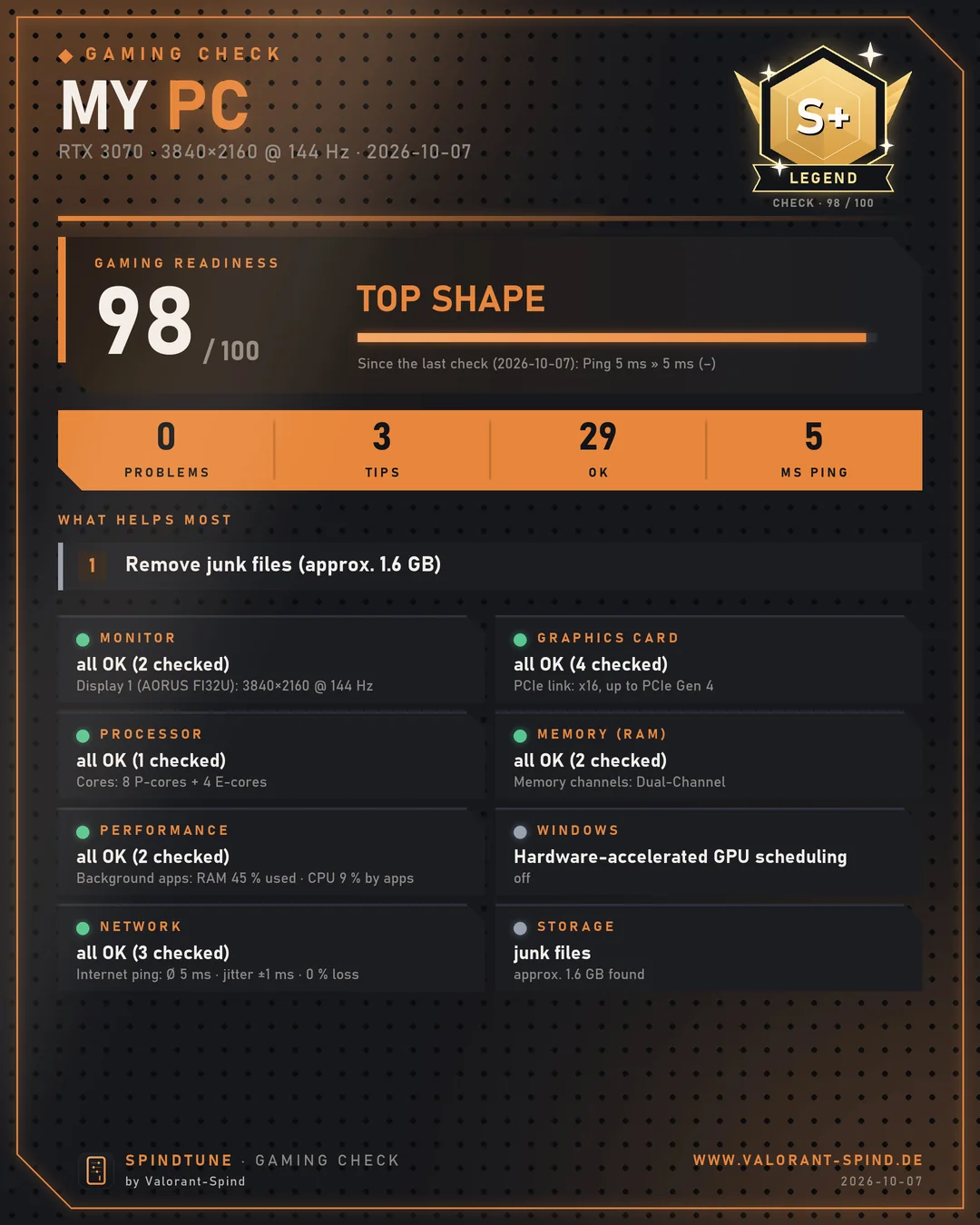
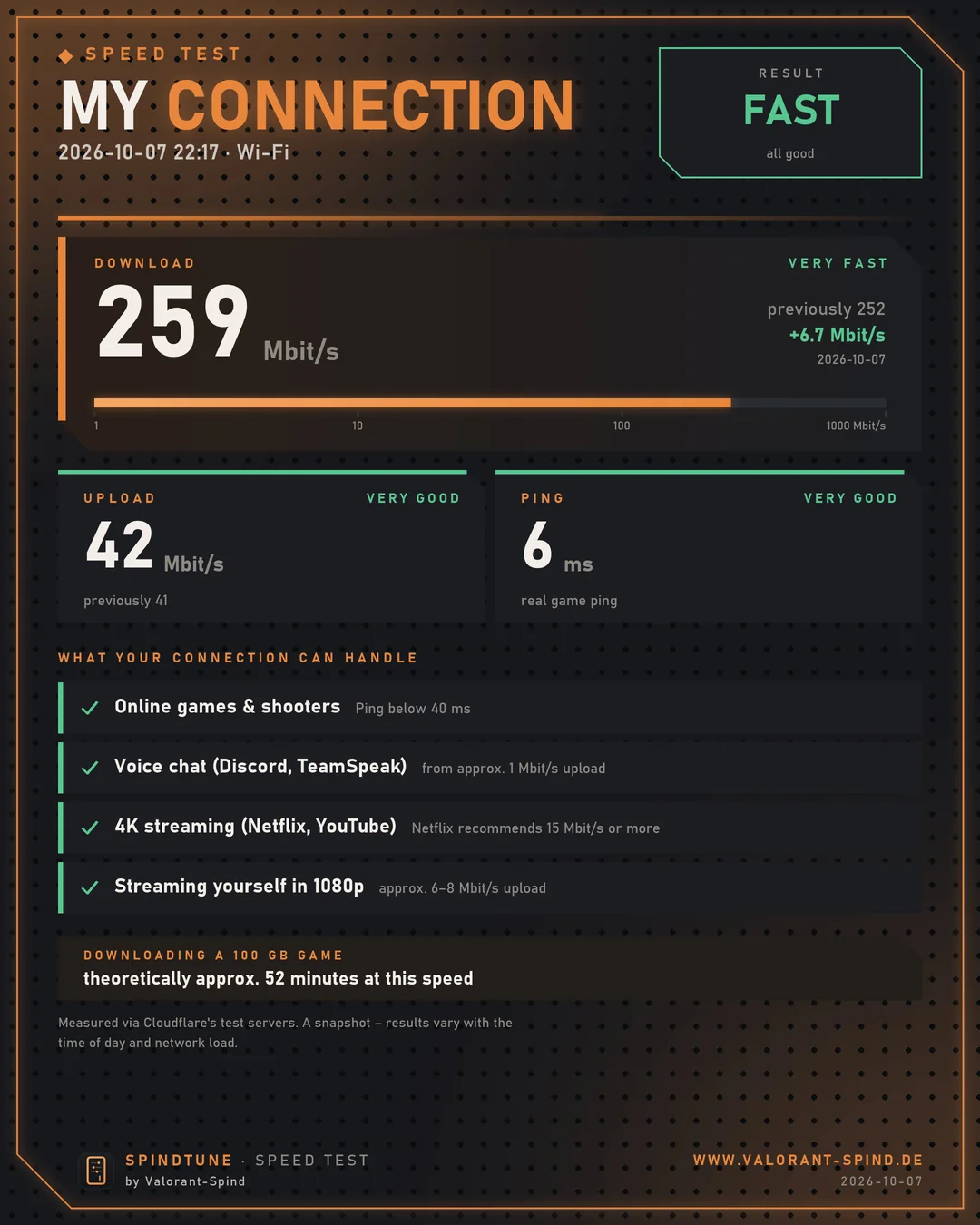
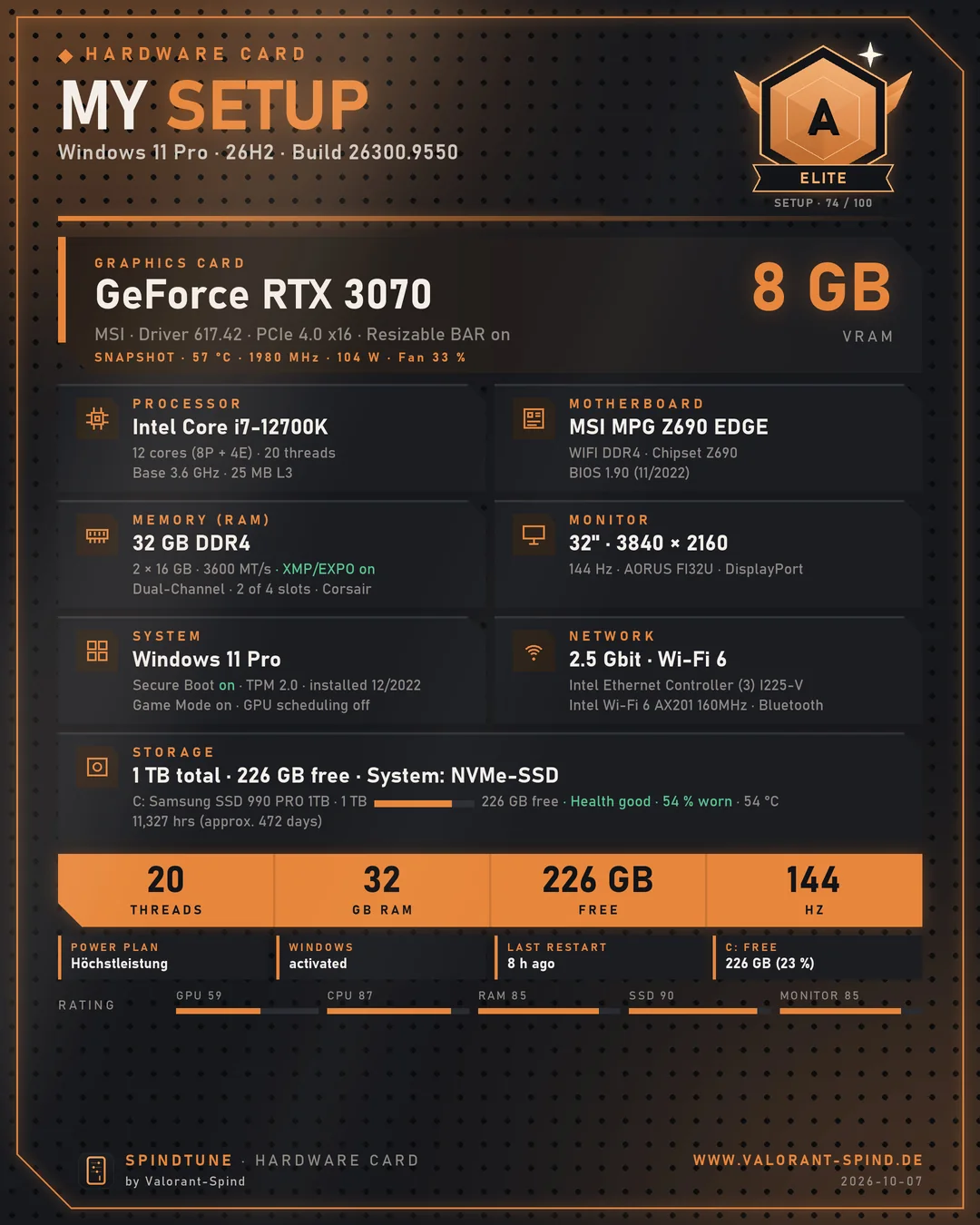
Save all three cards as JPG or PNG with one click – up to 2,160 × 2,700 pixels, perfect for Discord, Reddit or Instagram.
On Windows 11, Valorant only starts when TPM 2.0 and UEFI Secure Boot are enabled. If either is missing, Vanguard shows errors like VAN 9001 or VAN 9003. SpindTune’s Valorant Check tests everything Riot Vanguard requires in 10 to 30 seconds and explains every item in plain language.
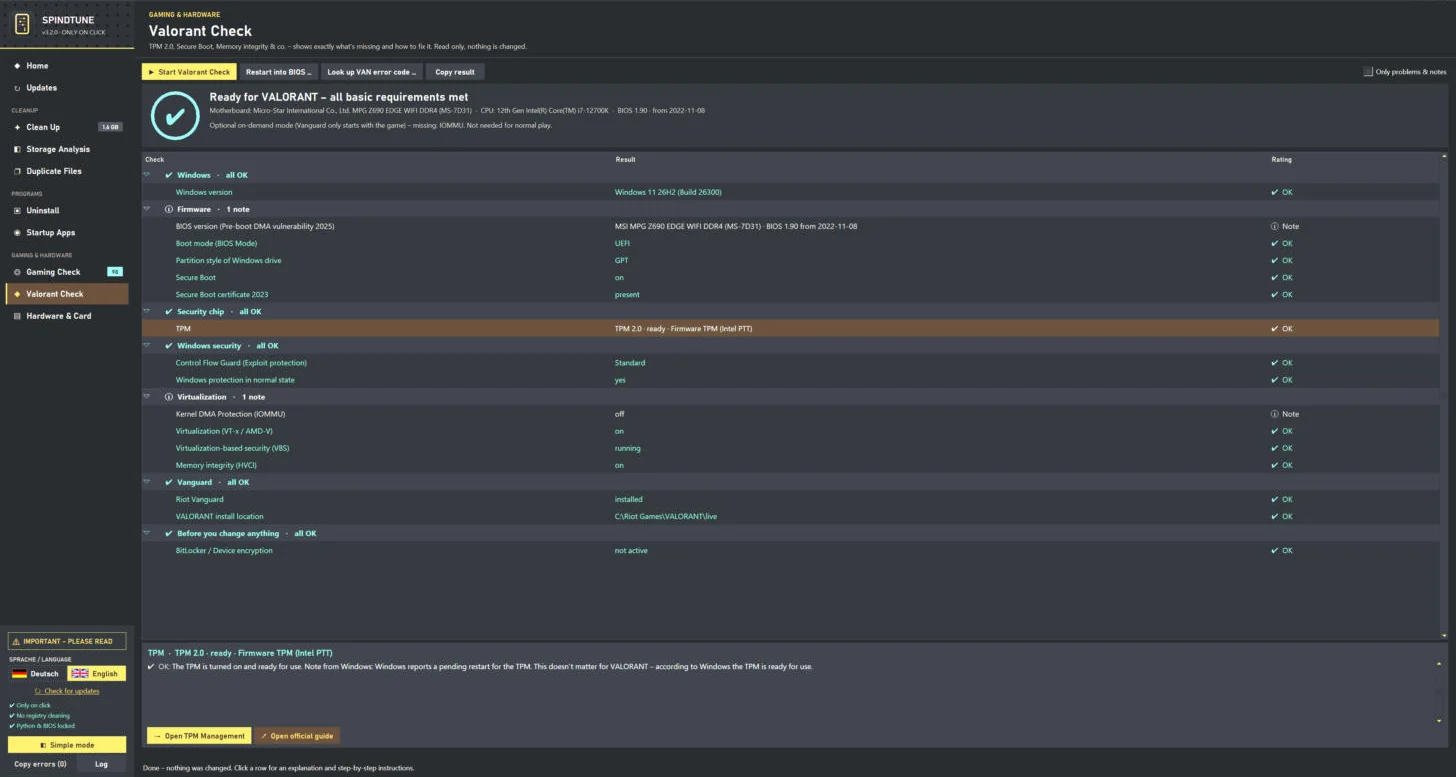
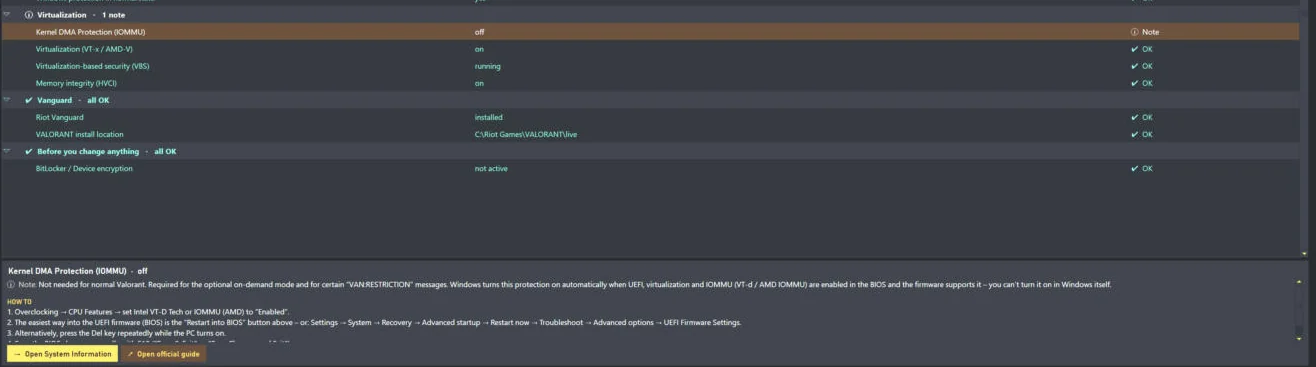
What makes it special: the instructions match your motherboard or PC and your CPU – with concrete BIOS paths for ASUS, MSI, Gigabyte and ASRock plus typical paths for Dell, HP, Lenovo and Acer. One button restarts your PC straight into the BIOS if you want (with a safety prompt). And the VAN error code lookup explains 27 codes from VAN 9001 to VAN:RESTRICTION. Important: the Valorant Check only reads – you change BIOS, partitions and settings yourself, guided step by step. The full guide without the tool is in Valorant: enable Secure Boot & TPM 2.0.
“Which motherboard do I actually have?” – SpindTune answers that in about 20 seconds. It reads the operating system, motherboard with revision, BIOS version and date, CPU with cores, threads and socket, memory per slot with brand and speed, graphics cards with drivers, drives with firmware, monitors with year of manufacture plus chipset, network, Bluetooth and audio drivers with dates. Every part comes with a link to the manufacturer’s support or driver page.
The Hardware Card turns all that into a shareable image in the Valorant-Spind look. You can add your power supply, cooler, case, mouse, keyboard and headset yourself. The setup tier from ROOKIE to LEGEND is an estimate without a benchmark: graphics card counts 45%, processor 25%, memory 12%, storage 10% and monitor 8%. The tier names are our own and not Valorant ranks. Serial numbers, user name and IP or MAC addresses never end up on the card.
A tool that works deep inside your system needs clear rules. SpindTune shows them on first launch and after every new version in a notice window that you confirm once. These are the principles:
How each action is safeguarded
What SpindTune never does
SpindTune is honest about its limits, too: app updates and uninstalls use the official publisher routes and don’t create their own restore point. Cleaned files and an emptied Recycle Bin are gone for good. And like every program that works with administrator rights, SpindTune can’t guarantee that nothing ever goes wrong. So the rule is: if you don’t understand something, just leave it out – the reason is in every row.
There are plenty of free PC cleaners. The difference is in the details – above all privacy and what a tool does in the background. Here’s how SpindTune differs from what many commercial cleaner programs bring along:
| SpindTune | Many commercial cleaners | |
|---|---|---|
| Price | free, no Pro version | free version plus Pro subscription |
| Account / sign-up | not required | sometimes for Pro features |
| Ads & upgrade prompts | none | common |
| Runs in background / at startup | never | often via a service or tray icon |
| Registry cleaning | deliberately not included | often a main feature |
| File list before deleting | yes, per item | varies |
| Reason per item | yes | rarely |
| Drivers only with restore point | yes, required | varies |
| Valorant Check (TPM, Secure Boot, Vanguard) | yes | no |
| Gaming Check with score | yes | mostly no |
Our tip: a good free PC cleaner doesn’t have to delete “everything” – it has to delete the right things and show you what happens. That’s exactly what SpindTune is built for.
The language follows your Windows settings. Use the flags in the sidebar to switch between English and German at any time – SpindTune restarts once to do so.
SpindTune is a free PC optimizer for Windows 10 and 11 that works where it counts: updates from official sources, cleanup without registry risk, a Gaming Check with a clear score and a Valorant Check that explains TPM and Secure Boot problems in plain language.
Most importantly: you stay in control. No account, no ads, no subscription, no background service, no telemetry – and nothing happens without your click.
Yes. SpindTune is completely free, with no subscription, no Pro version and no in-app purchases. It’s a private project by Valorant-Spind and shows no ads.
No. There’s no sign-up, no account and no email request. Download the setup, install SpindTune and start right away.
No. SpindTune contains no telemetry and doesn’t upload any data about you. It only goes online when you start a feature that needs it – such as updates through Microsoft, drivers from NVIDIA or AMD, the Cloudflare speed test or the cleanup database update. Settings and history stay local in %LOCALAPPDATA%\SpindTune.
In Clean Up, run the analysis first, select only the items marked “recommended” and keep the restore point ticked. A double-click shows every file that would be deleted, items of open browsers are blocked, and SpindTune never touches the registry.
No, on purpose. Microsoft explicitly doesn’t support registry cleaners because they can cause serious problems. That’s why SpindTune also skips the registry rules of the Winapp2 database. Only the startup manager changes startup entries – like Task Manager does – and only when you click.
Windows updates, driver installs, restore points and cleaning system folders like the Windows Update cache only work with administrator rights. That’s why Windows asks once when you launch it.
Yes. SpindTune runs on 64-bit Windows 10 and Windows 11. A small setup wizard takes care of the installation.
SpindTune is currently not digitally signed, so SmartScreen often reports new, unsigned programs as “Unknown publisher”. Only download SpindTune from valorant-spind.de and compare the SHA-256 checksum on this page if you like.
No. The Valorant Check only reads and shows you what’s missing – with step-by-step instructions for your motherboard. You flip the BIOS switches yourself. If you want, SpindTune restarts your PC straight into the BIOS after a safety prompt.
No. The Gaming Check compares your hardware with official game requirements but doesn’t measure FPS. The temperature test shows the graphics card temperature and whether the CPU clock drops – Windows can’t reliably read the CPU temperature itself without extra software.
Like any normal program: Settings → Apps → Installed apps → SpindTune → Uninstall. Your settings stay in %LOCALAPPDATA%\SpindTune; delete that folder if you want to remove them too.
As of October 7, 2026 · SpindTune 3.2.0. All screenshots are real captures of SpindTune on Windows 11. Cleanup database: Winapp2 (MoscaDotTo/Winapp2, CC BY-SA 4.0). SpindTune is an independent project by Valorant-Spind and not an official product of Riot Games, Microsoft, NVIDIA, AMD or Intel. Use at your own responsibility – full details on privacy and the disclaimer & terms of use.

