
Valorant skin value & coach – the app
Your locker. Decrypted.
Valorant-Spind reads your entire collection, converts every skin into VP & euros and analyzes your matches like a personal coach – with kill heatmaps, aim analysis and a 2D match replay that rebuilds every match kill by kill. The analysis runs locally on your PC.
Last updated: October 30, 2026
✓ Free · Windows 10 & 11 · approx. 19 MB · no login, no password
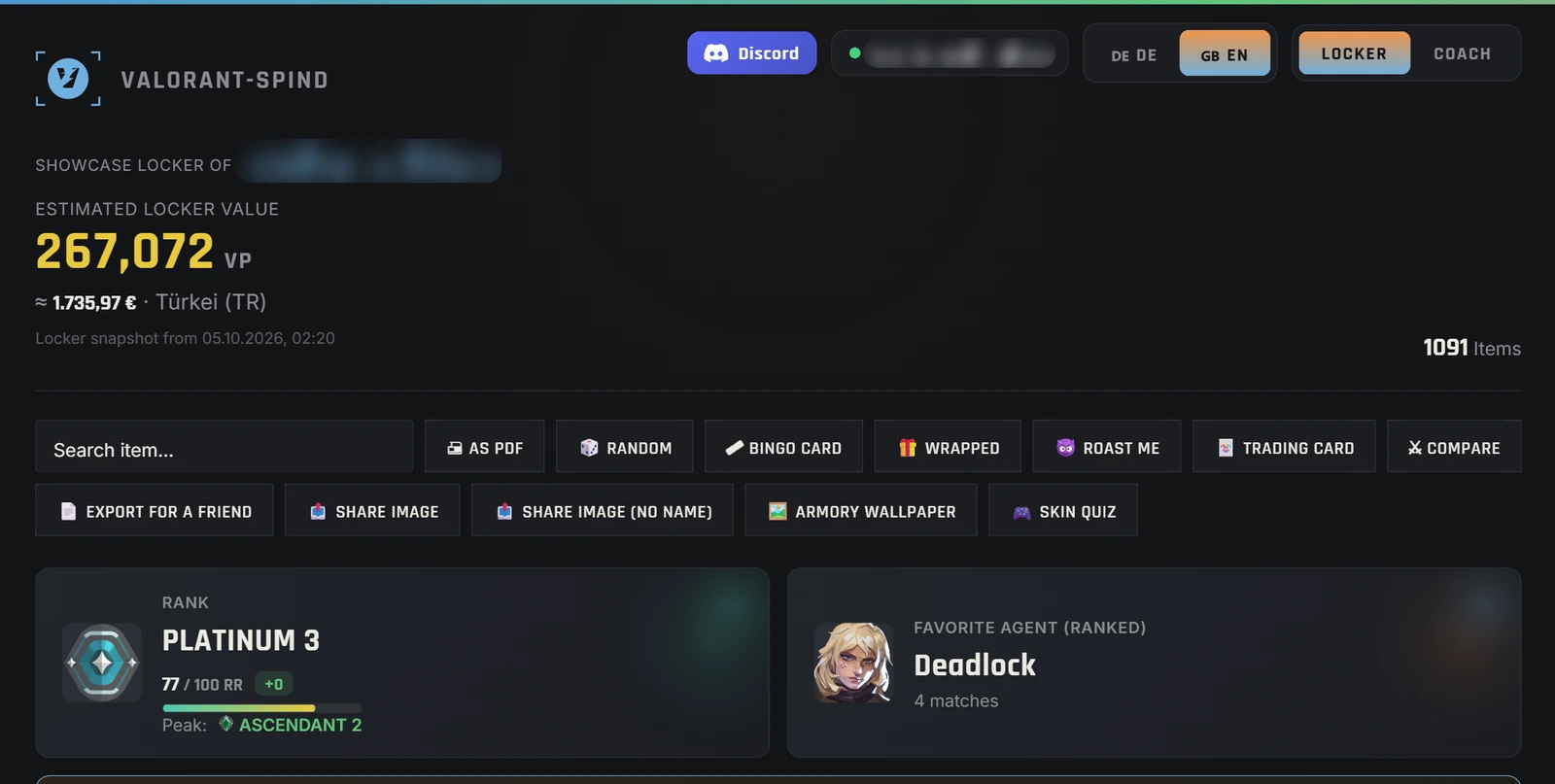
Everything your account doesn't show you – in one app
Locker value in VP and euros, daily shop and Night Market, rank career per act, a coach built from up to 100 matches and a 2D replay of your last 20 ranked matches. Free, no ads, no login – analyzed locally on your PC.
- Locker: every weapon skin and knife at list price, top 5, rarity score and Radianite calculator
- Shop & season: daily shop, featured bundle, Night Market with time left, Battlepass and rank career
- Coach & replay: heatmaps, aim analysis, duel and crosshair X-ray, highlight finder
What is the Valorant-Spind app?
Valorant-Spind is a free desktop app for Windows that shows you in seconds how much your Valorant inventory is really worth. It recognizes every weapon skin and every knife, adds up their list prices in Valorant Points and converts your locker value into your currency – the app derives it from your Riot account’s country. It shows a money value in the eurozone, the US, Canada and Turkey; elsewhere you see the value in VP. Buddies, player cards, sprays and titles are shown too, but they are not valued.
On top of that, there’s a full-fledged coach that analyzes your real ranked matches: core stats like KDA and headshot rate, aim and reaction analysis, performance per agent and kill and death heatmaps directly on the real map. The app requires no login and shows no ads. Your locker and match data stay on your PC – no account with us, no server of ours. The app only downloads game data (images, names) and checks for updates. You'll find more on values in our guides Valorant skin value and account value.
The locker – your collection value at a glance
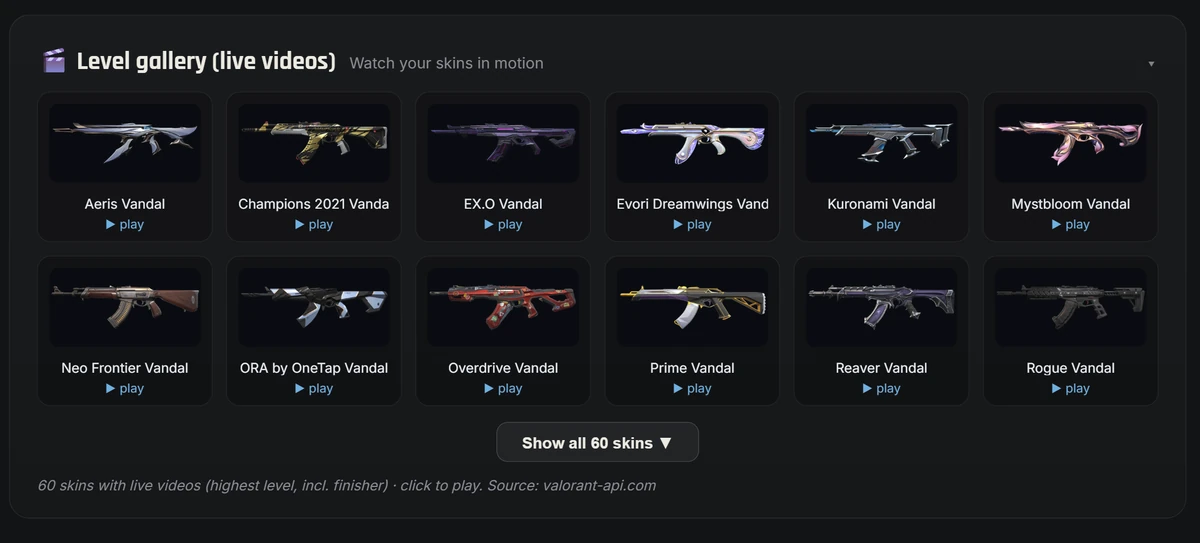
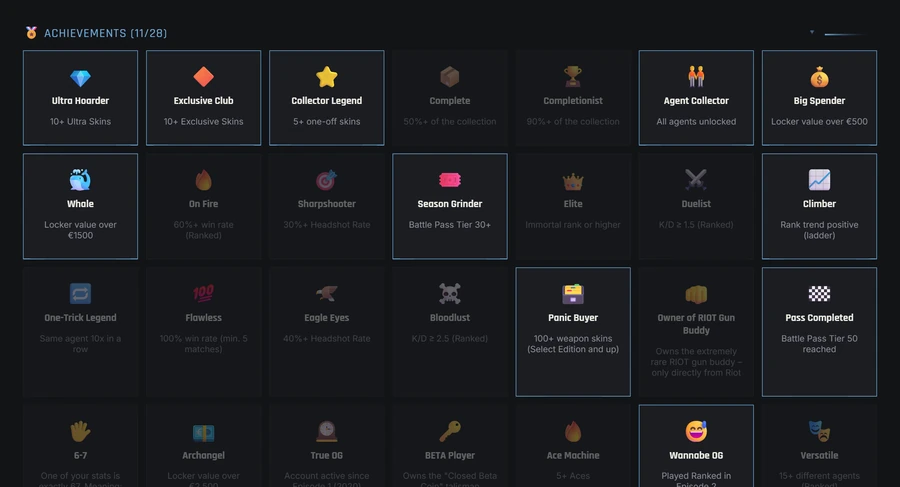
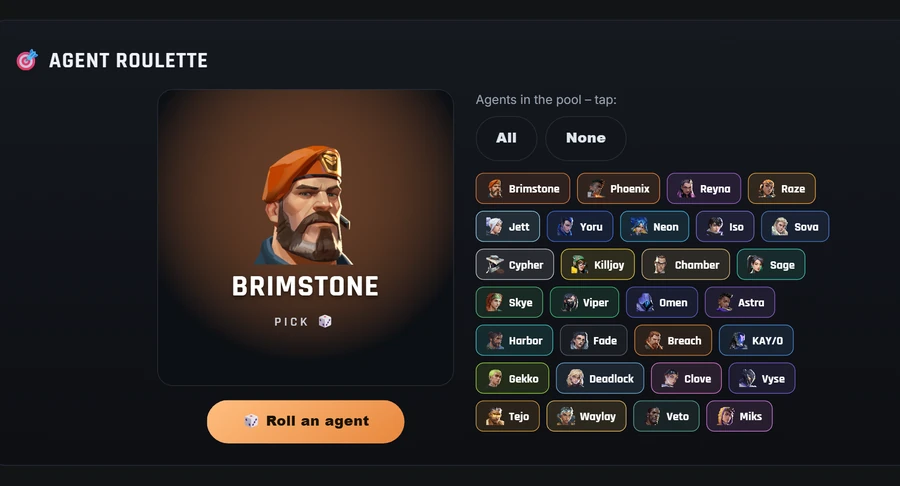
Collection value in VP & euros, all skins, Radianite, season overview – plus a few playful extras.
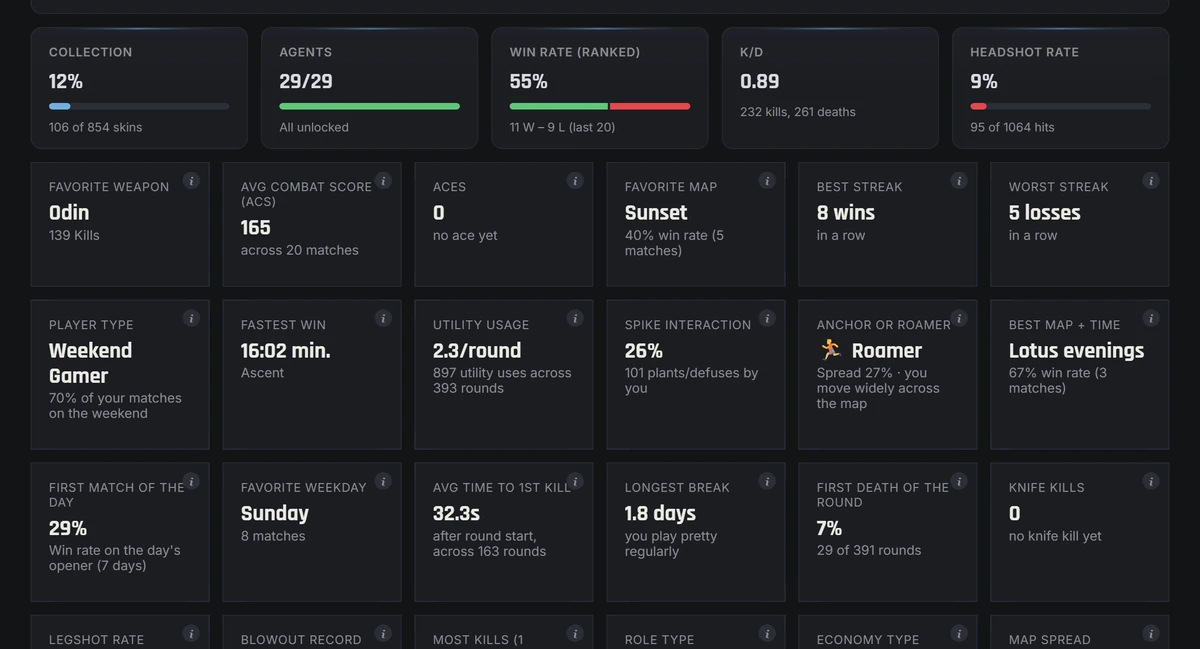
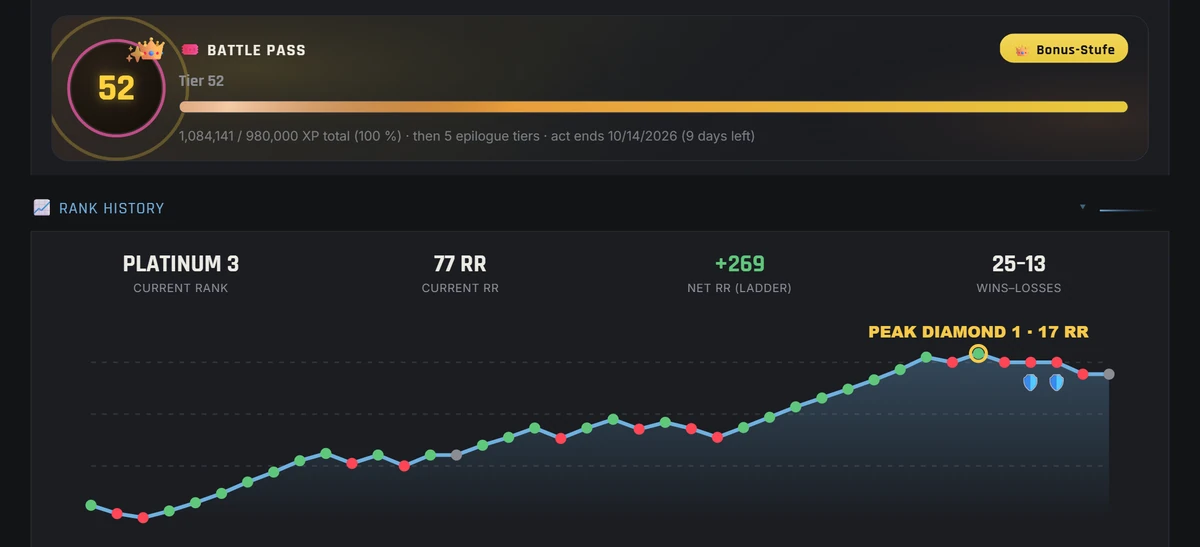
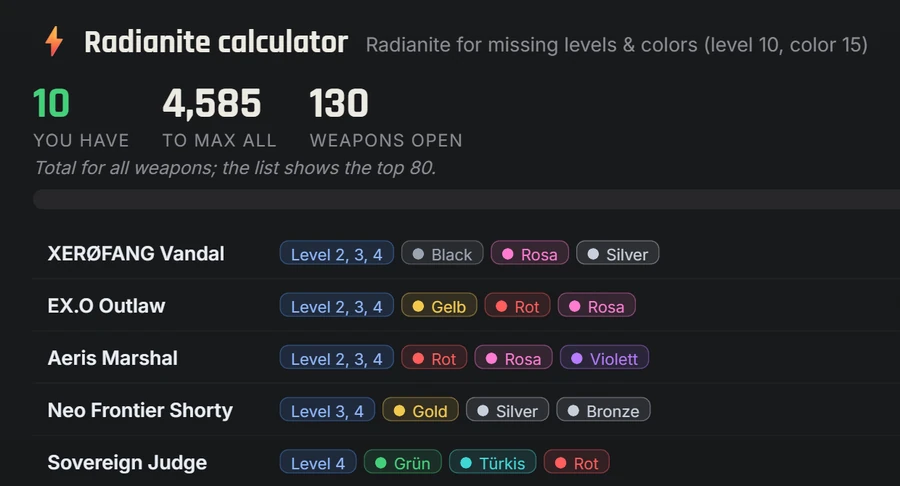
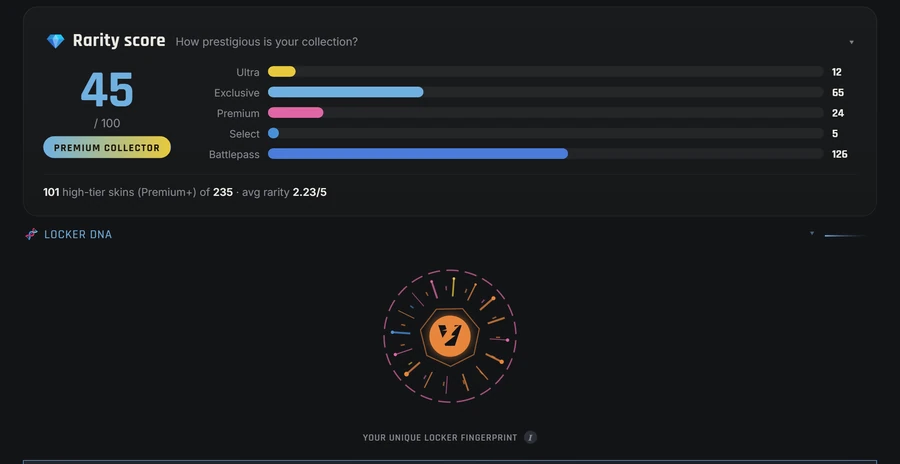
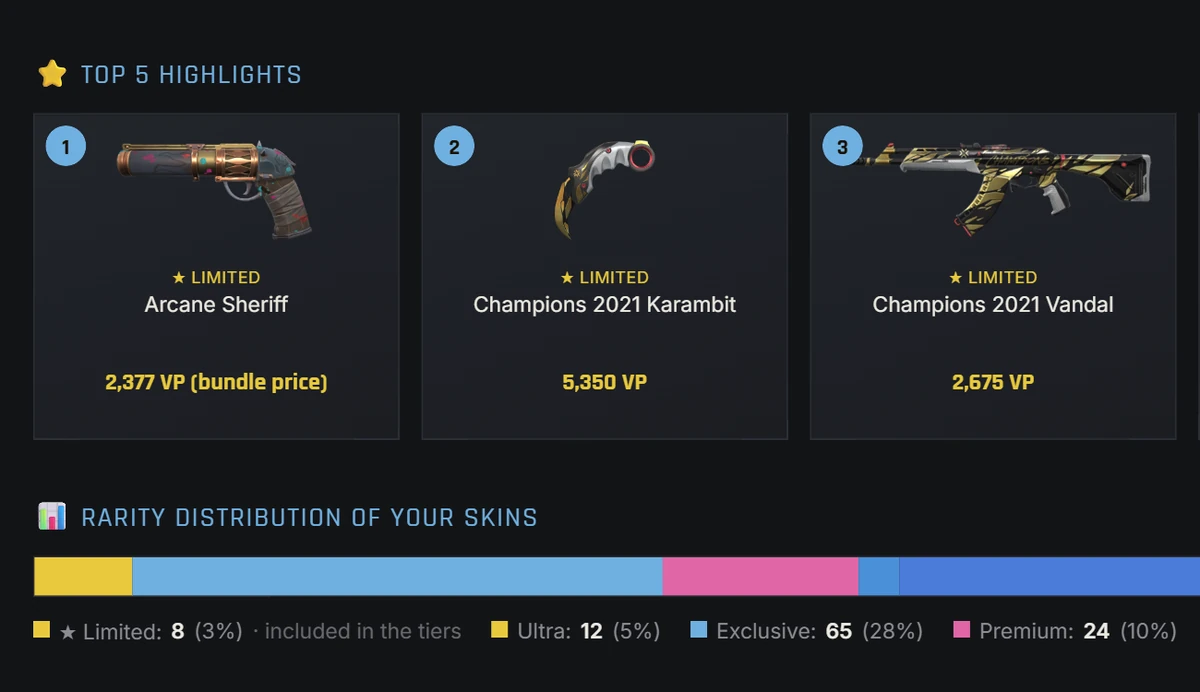
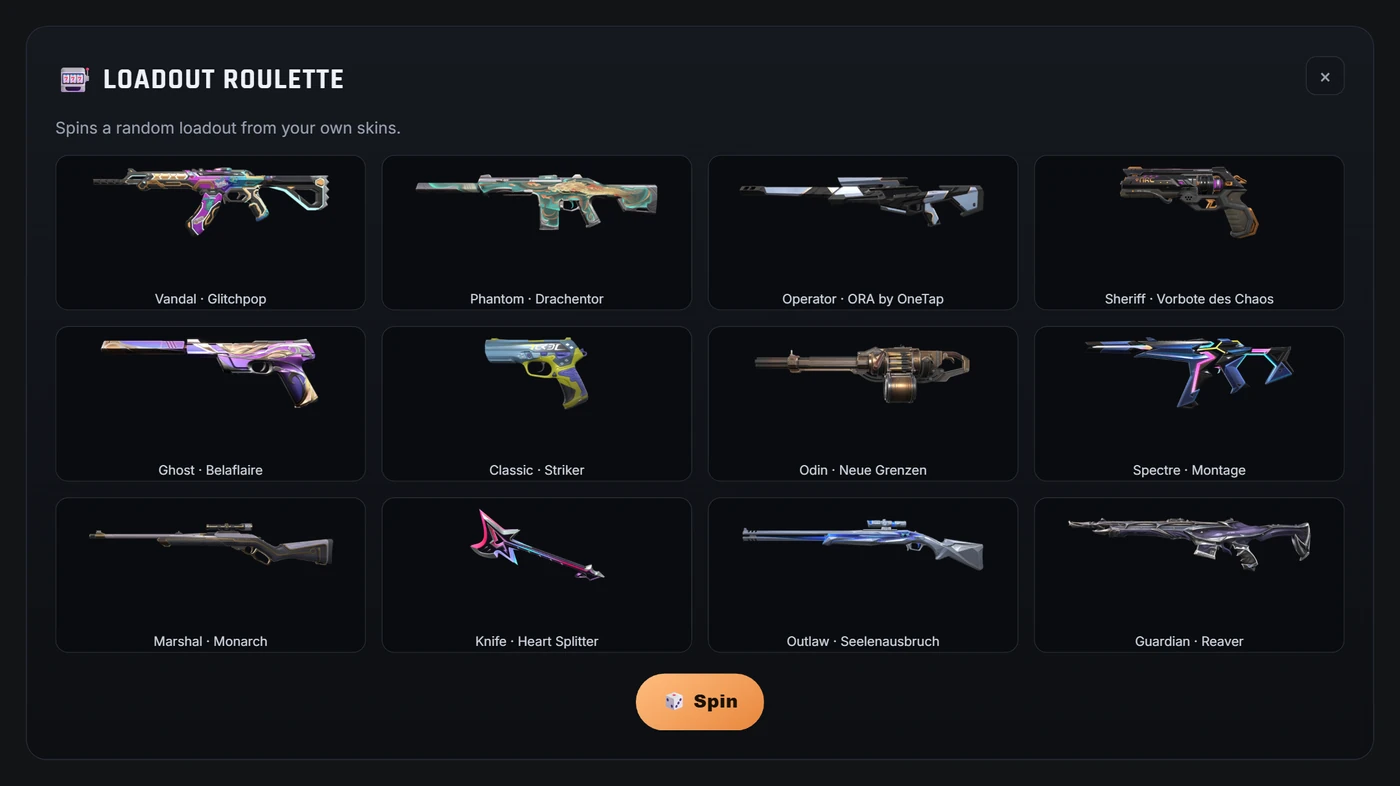
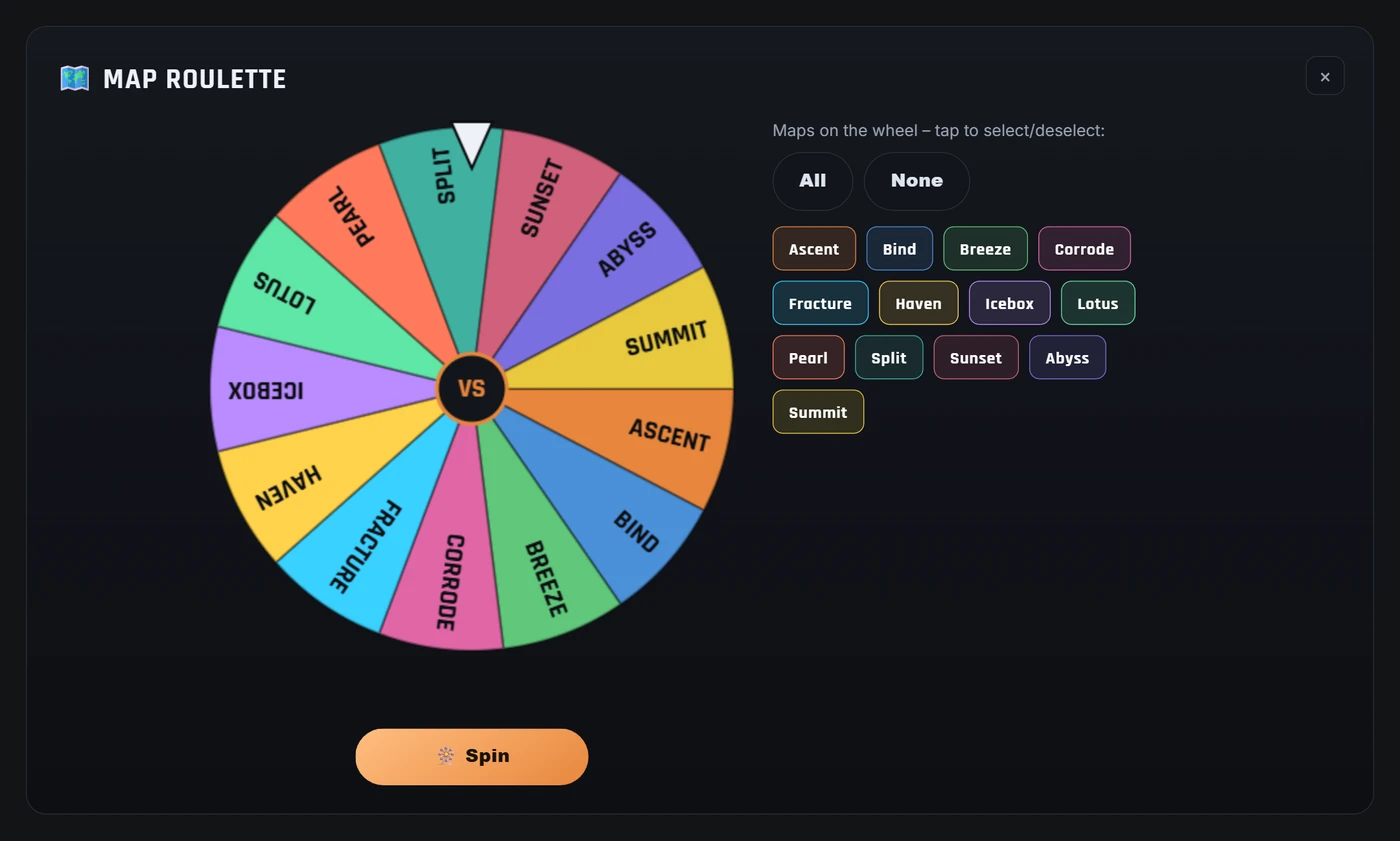
🧾 Riot’s purchase history only shows how much you paid for VP – the app shows what you have in your locker for it. Here is how to open your Valorant purchase history and analyze it.
The 2D match replay – your match, rebuilt kill by kill
★ Your ranked match as an interactive reconstruction on the real map – with the position and view direction of every player at every kill second. Free, no login, right inside the app.
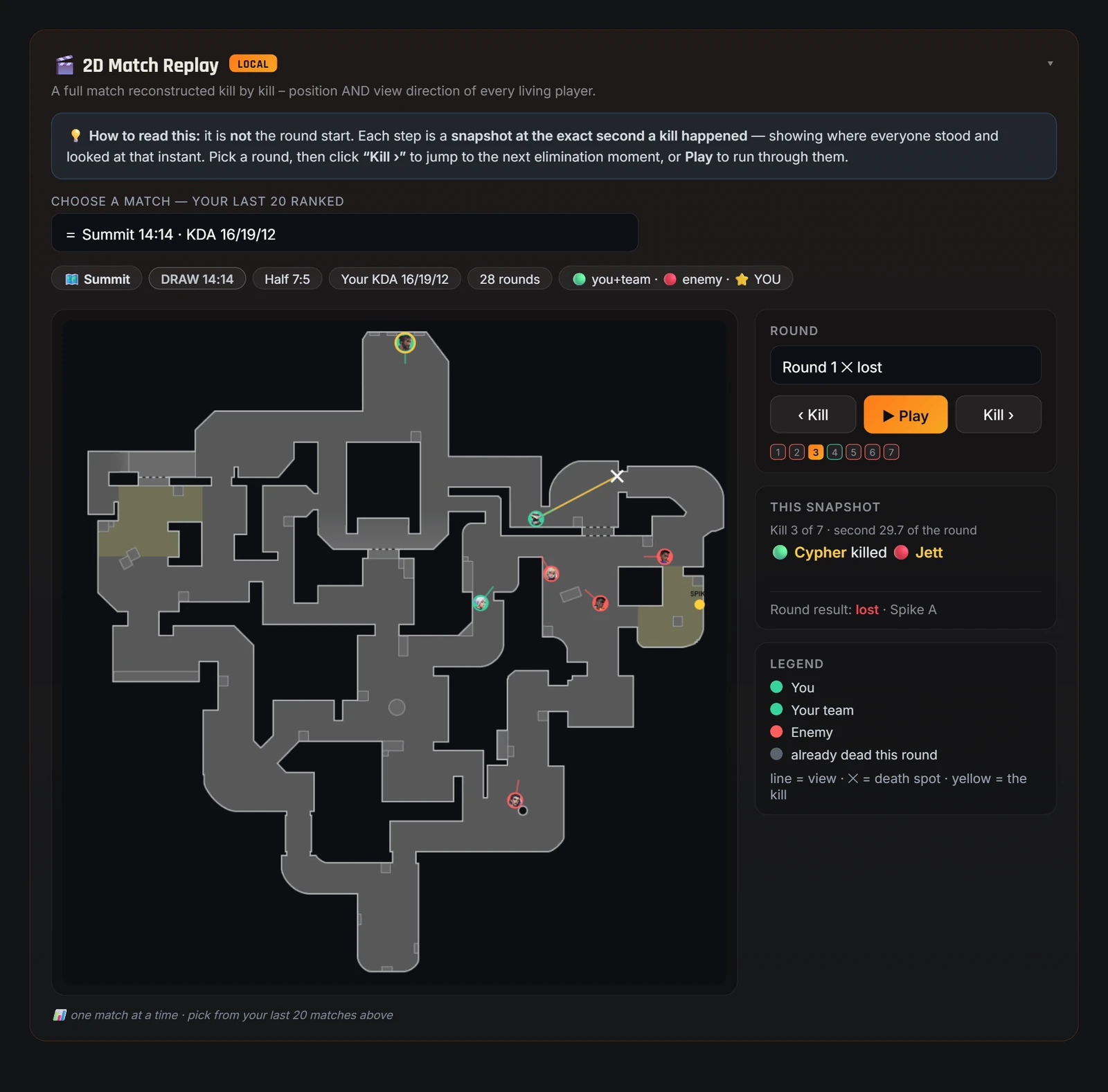
Pick one of your last 20 ranked matches and any round – the app rebuilds the action kill by kill: for every kill second you see where each living player stood and where they were looking. Jump from kill to kill with one click or let the round play out – with clear feed messages, a marked death spot and true spike timing: the spike only appears once it was actually planted in that round.
Every step is a snapshot of the exact second a kill happened: yellow marks the kill, ✕ the death spot, lines show view directions. Rotations, flanks and crossfires become obvious at a glance – you finally see why you died.
The app automatically finds your aces, multikills and won clutches – and plays each of those moments right at the correct spot in the 2D replay. Your personal best-of, no recording software needed.
The replay is built right on your PC from the match data the app fetches from Riot through your own Riot client: no account, no upload, no replay file needed. Riot provides positions for the kill moments – that is why the replay shows a snapshot per kill. Full details in the changelog.
How it works
From download to your complete locker value in under a minute.
Download and open the free app. No account, no extra software installation needed.
While your Riot client is running, Valorant-Spind reads your collection locally – without login and without password.
In 30–60 seconds you see your skin value in VP & euros and the complete coach analysis.
The coach – your match analysis from real games
Core stats, aim, heatmaps and team intel – in depth from your real ranked matches.
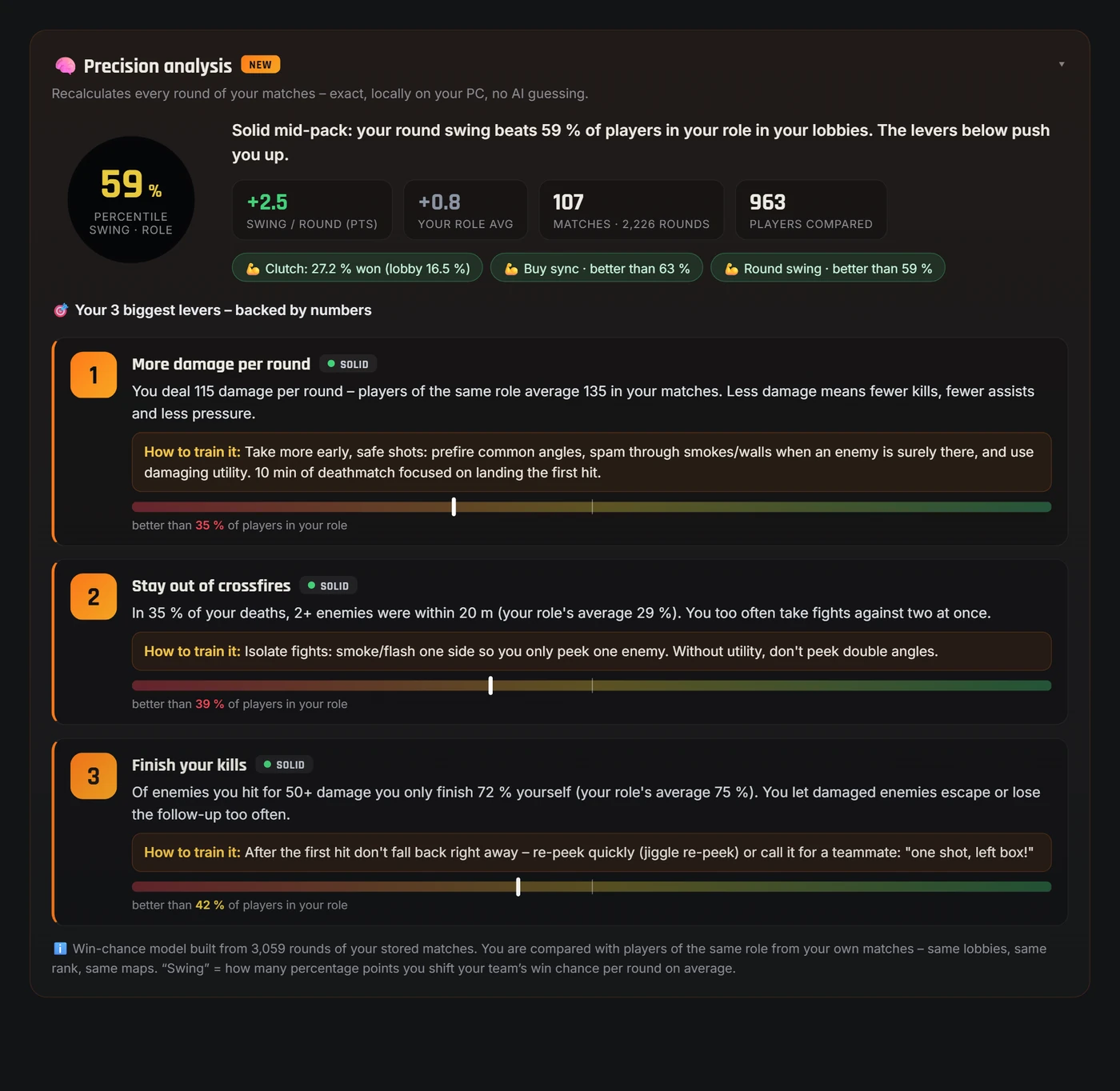
Precision analysis: your 3 biggest levers
A win-chance model built from your stored rounds rates every action by its real impact – plus a role-fair lobby comparison and your 3 biggest levers, each with a number, a confidence level and a concrete training tip.
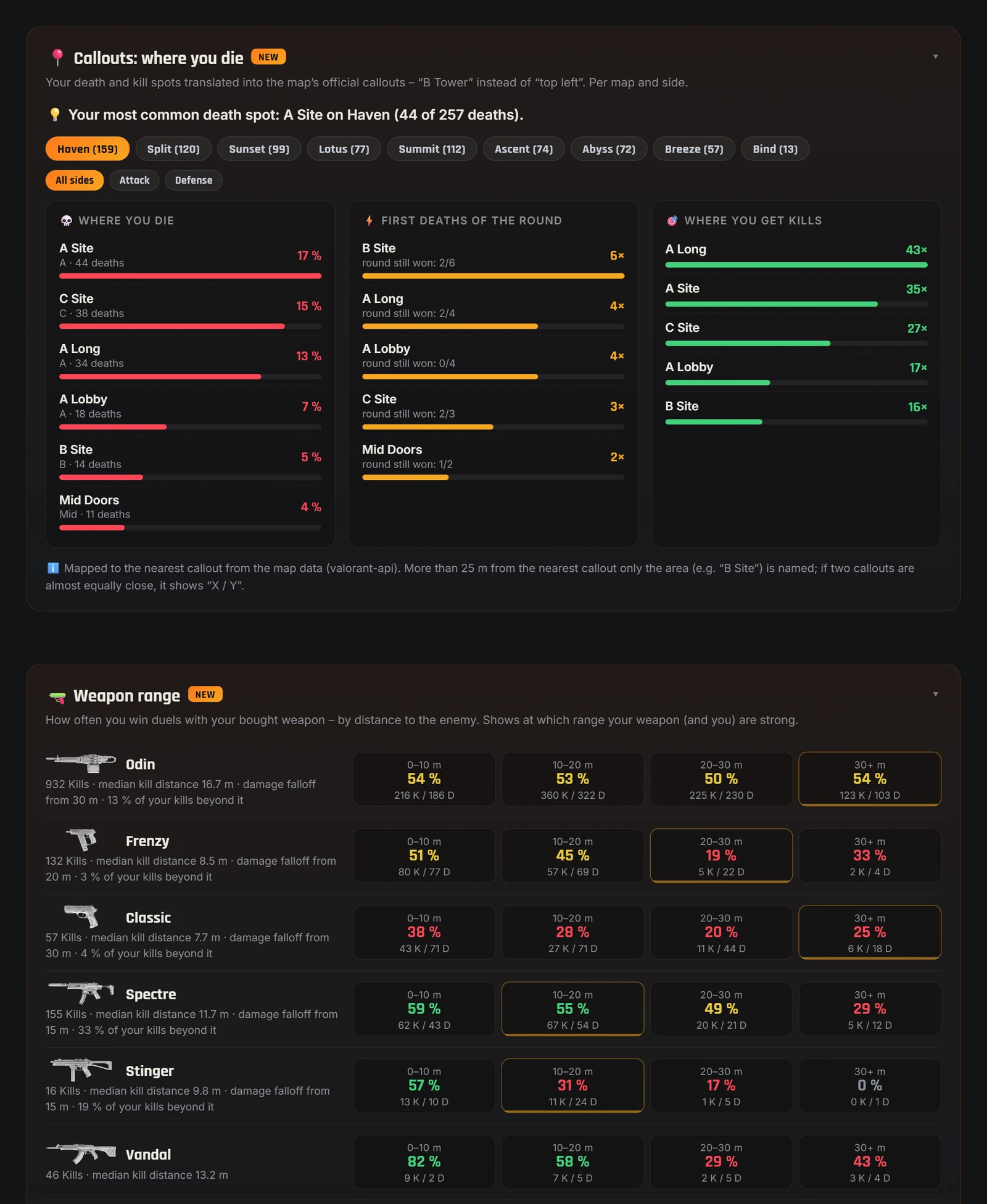
Callouts & weapon range
Your deaths and kills translated into the map’s official callouts – instead of “top left” it says “B Tower”, per map and side. Plus, weapon range shows at what distance you win duels with your bought weapon – including damage falloff.
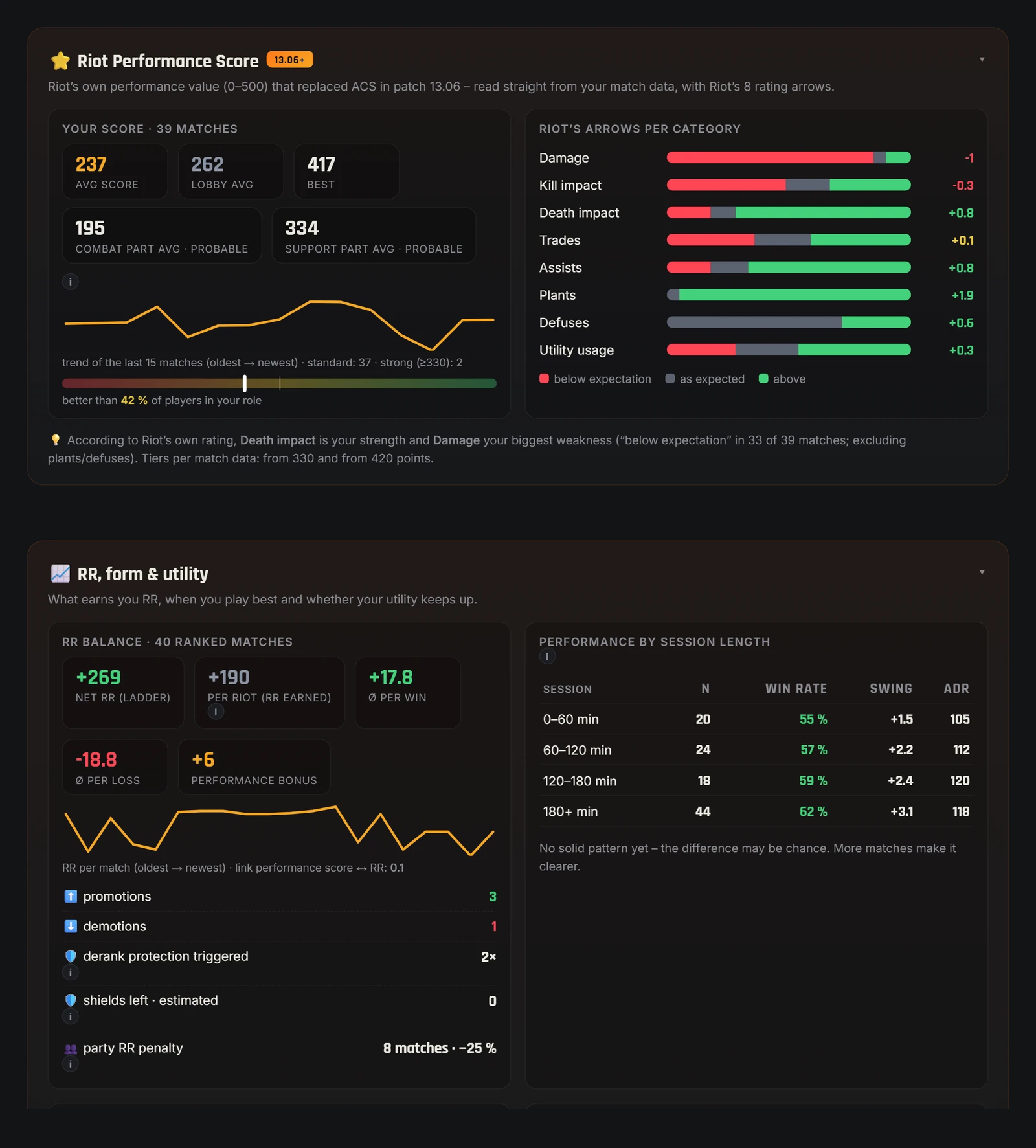
Riot performance score & real RR balance
Riot’s own performance value (0–500) straight from your match data – with Riot’s rating arrows for damage, trades, assists, utility and more. Plus your real RR balance: net RR, avg RR per win and loss, performance bonus and derank protection – and your win rate by session length.
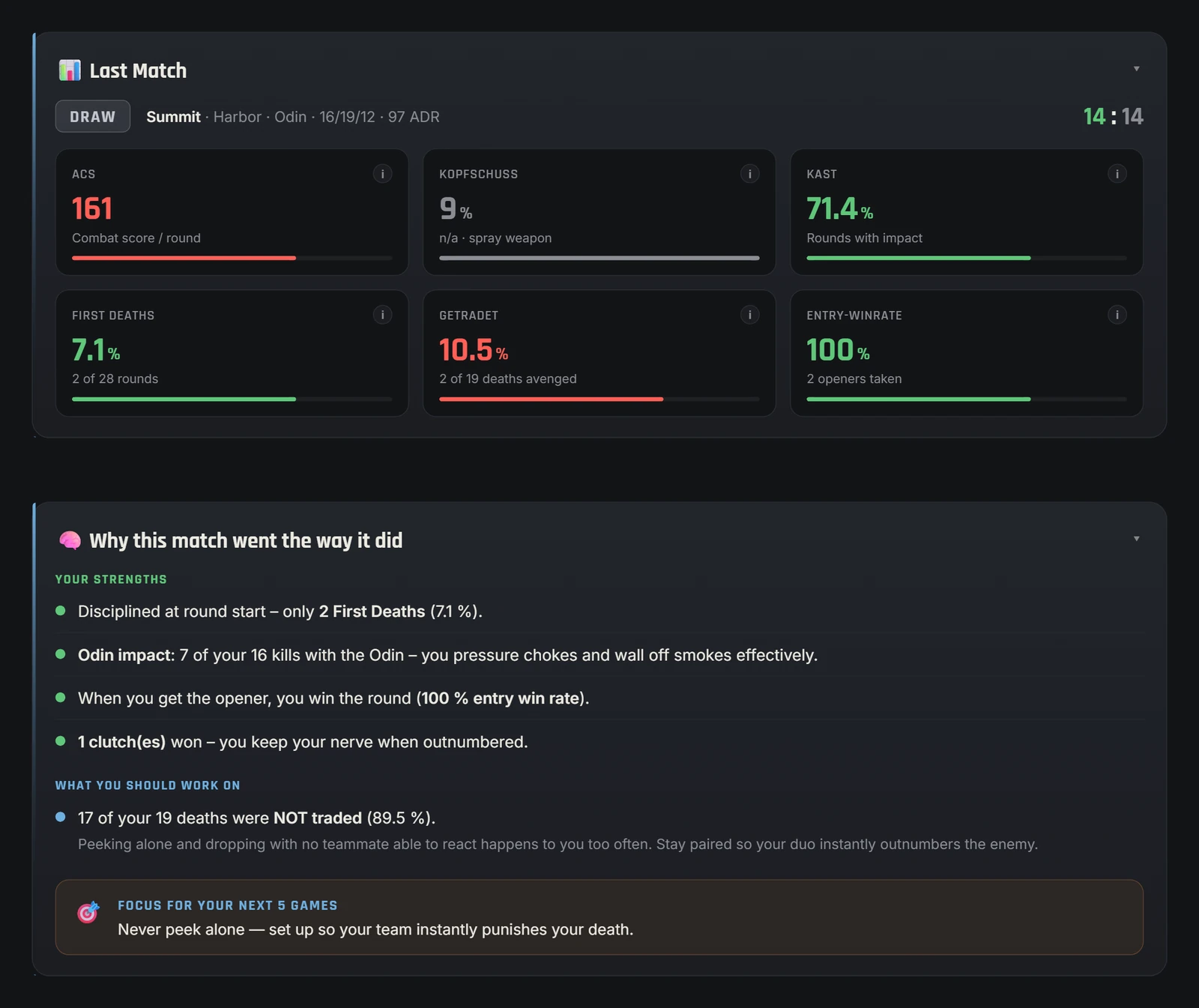
ACS, KAST, headshots – and why the match went the way it did. Plus attack-vs-defense and economy, round by round.
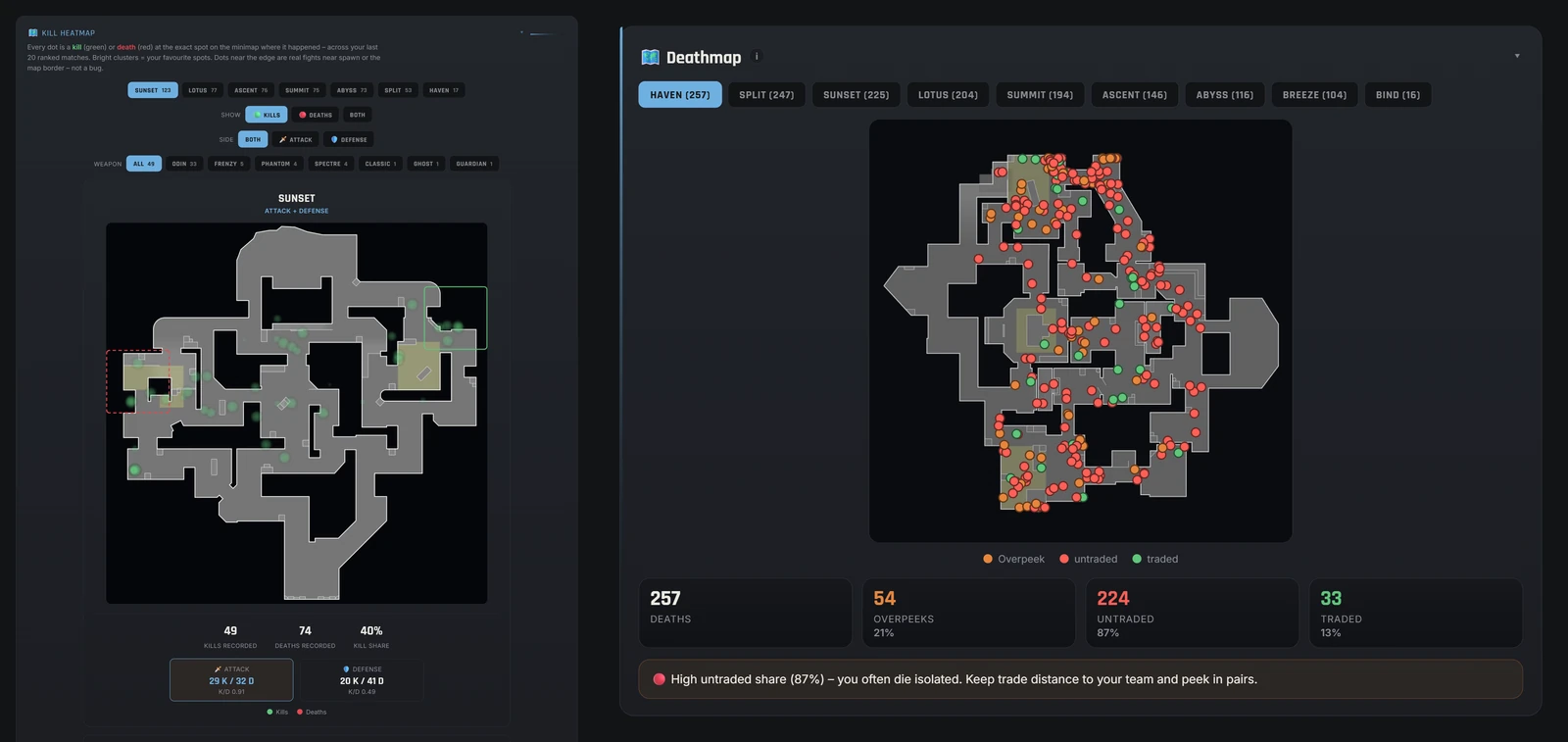
Every kill and death on the real map – switchable by side and weapon, with overpeek, trade and comfort/danger-zone analysis.
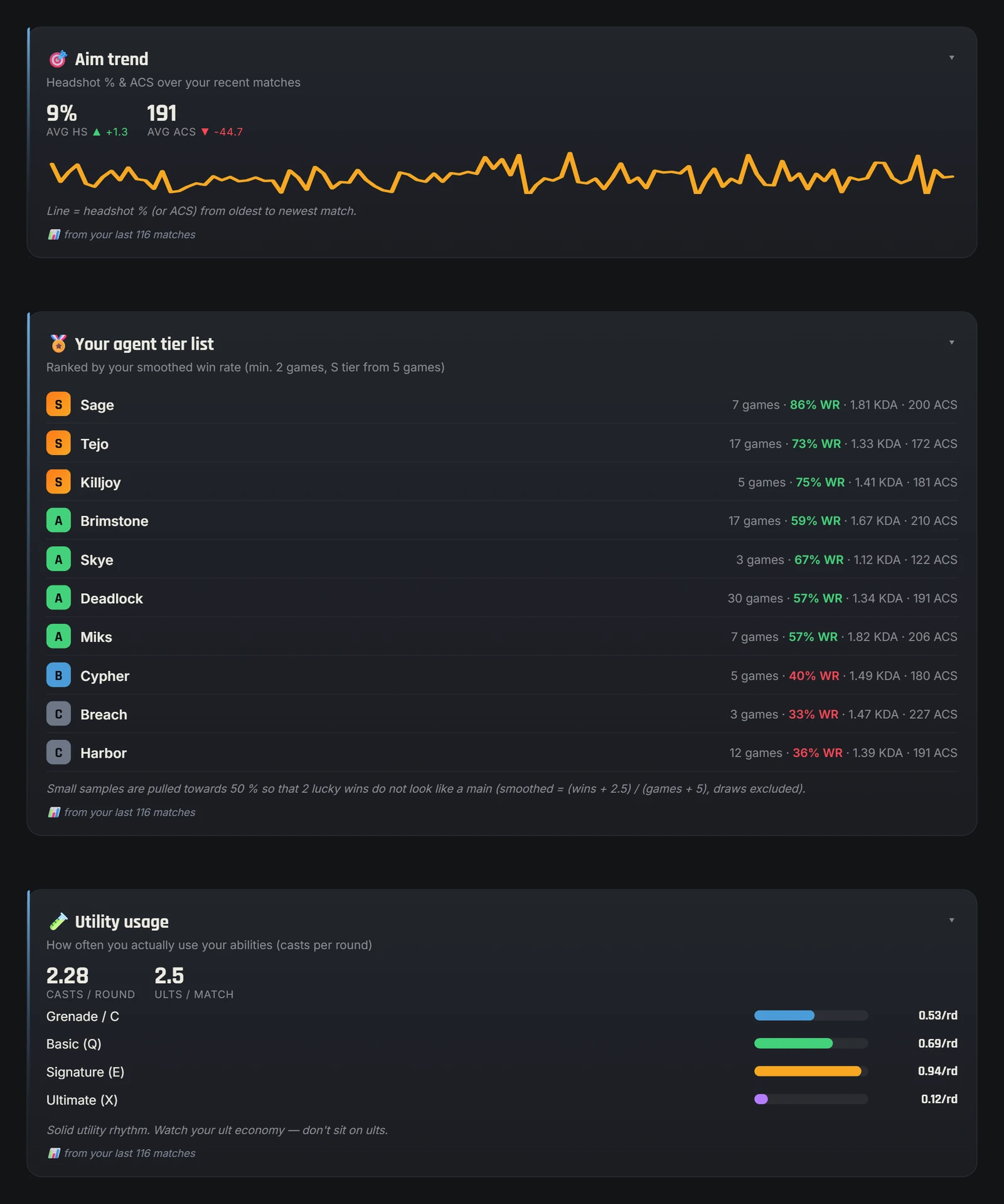
Aim trend & agent tier list
Headshot trend across your recent matches, your agent tier list by win rate and your utility usage.
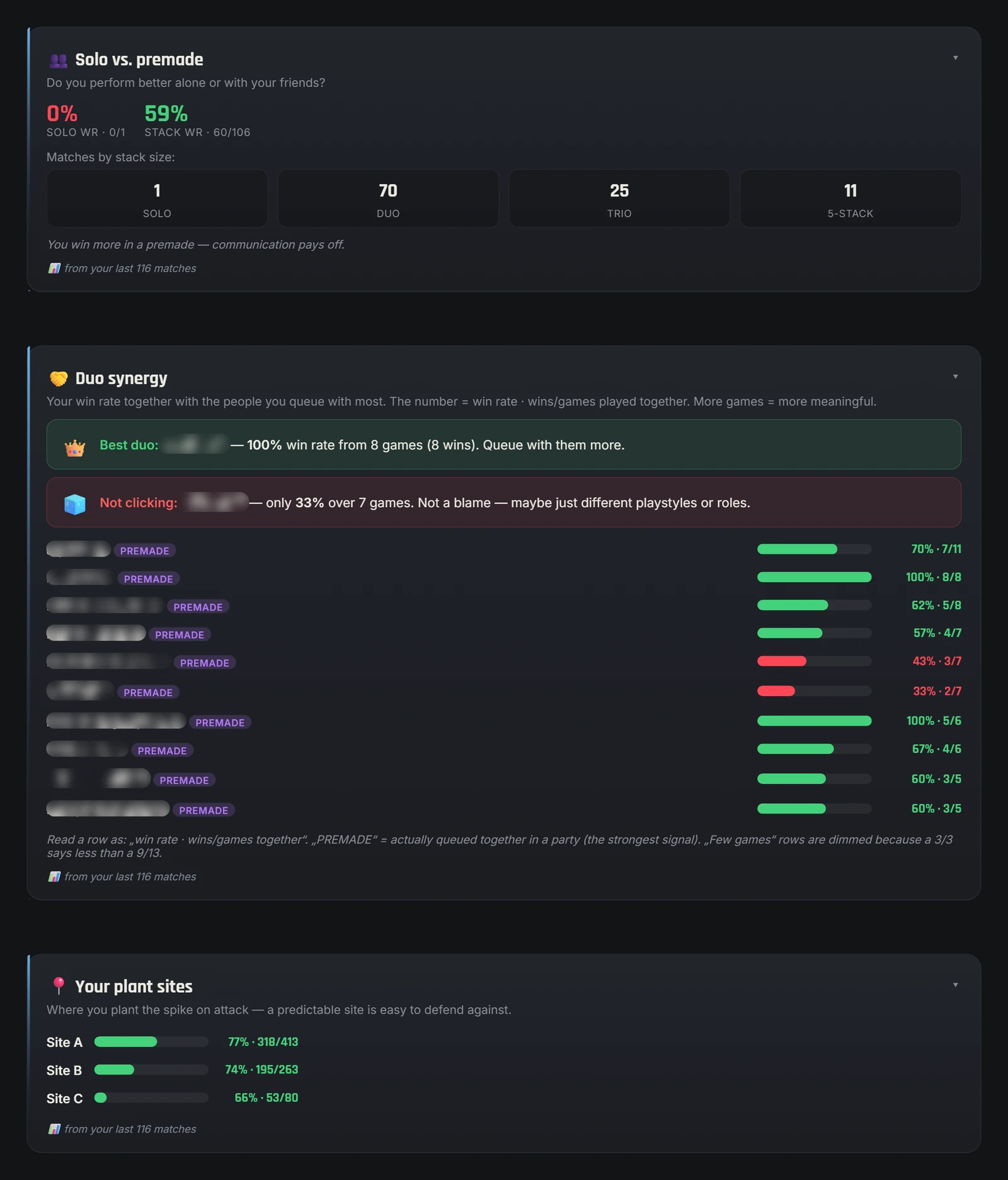
Solo, premade & smurf radar
Solo-vs-premade win rate, duo synergy with your teammates, plant sites, smurf signals and a tilt detector.
Why Valorant-Spind?
Collection value, statistics and coaching – in one free tool.
How much is my Valorant account worth? The Valorant-Spind app answers this question in seconds. Instead of looking up every skin individually in the store, the app reads your entire collection and shows you the locker value in Valorant Points and euros – transparent and easy to follow, in your currency (eurozone, US, Canada, Turkey; elsewhere in VP). What the app can’t show, however, is how much you’ve actually spent on skins: it doesn't know whether you bought a skin individually, in a bundle or in the Night Market, and it knows neither discounts nor the amount you paid.
Unlike a pure online tracker, Valorant-Spind runs locally on your PC. You enter no login data and link no account. Your locker and match data stay on your PC – no account with us, no server of ours; the app only downloads game data (images, names) and checks for updates. On top of that, the built-in coach gives you a real match analysis: kill and death heatmaps on the real map, your aim and reaction values, performance per agent and a round breakdown – ideal for improving in a targeted way.
Whether you want to know your collection value, discover your most expensive skins or improve your gameplay – the free app bundles locker value, statistics and coaching in one place. More on this in the guides Valorant skin value, account value and skin spending.
Runs on your PC and requires no credentials. No account with us, no server of ours.
Every weapon skin and every knife at list price – summed to your collection value.
Core stats, aim analysis and kill/death heatmaps from your real ranked matches.
Browser tools or app? An honest comparison
What you get directly in your browser on valorant-spind.de – and what you need the app for.
| Browser tools on valorant-spind.de | Valorant-Spind app | |
|---|---|---|
| Locker value | Tap skins by hand in the skin calculator | ✓ Read automatically |
| Price basis | Our price list based on the VALORANT Wiki, fixed euro rate | ✓ List price per skin, money value in your currency (eurozone, US, Canada, Turkey) |
| Daily shop & Night Market | – Guides and simulator only | ✓ Your real shop, Night Market with time left |
| Rank career per act | – | ✓ Final rank, peak, wins |
| Match coach | – Individual training tools | ✓ Up to 100 matches |
| 2D match replay | – | ✓ Last 20 ranked matches |
| Sharing | Screenshots | ✓ Wrapped as video, GIF or PDF |
| Works on your phone | ✓ | – Windows 10 & 11 |
| Installation | ✓ None | ~19 MB |
| Login or password | ✓ Not needed | ✓ Not needed |
You will find 70+ browser tools in the tools overview – they stay free and download-free.
The app in detail – what's really inside locker, replay and coach
An honest walkthrough of every part of the app – so you know exactly what to expect before downloading.
How your locker value is calculated
As soon as your Riot client is running, Valorant-Spind reads your entire collection directly on your PC – no login, no password. Every detected skin is matched to its list price in Valorant Points, the app adds everything up and converts the total into your currency. The app derives the currency from your Riot account’s country and only shows a money value where a verified VP pack price exists: in the eurozone, the US, Canada and Turkey – elsewhere, for example in Switzerland or the UK, you see the VP value. You can also pick the currency manually for each Riot account. Only weapon skins and knives are valued, each skin exactly once – no matter how many levels you have unlocked. Skins never sold individually (e.g. from capsules or event packs) are valued at that pack’s price, which may include accessories such as a card or buddy. Battlepass and agent skins count as 0 VP; buddies, player cards, sprays and titles are not valued. The “Only from Select” toggle only filters the collection heatmap and hides Battlepass and agent weapon skins there – it does not change the locker value. Important: the locker value is an estimate based on list prices without discounts and does not prove how much you actually spent.
Around the raw value, the locker offers a whole set of views: a weapon skin gallery with expandable details and level videos, a collection heatmap showing where your collection is dense and where it's thin, a rarity score with your top 5 rarities, fun facts like your favorite weapon – and achievements like “price per kill”, which puts your most expensive weapon in relation to its kills. The Radianite calculator shows, for every weapon, which color variant and which levels are still missing, correctly subtracts colors you already unlocked, and calculates costs at 10 Radianite points per level and 15 per color – figures verified against an official source.
The 2D match replay in everyday use
The replay is more than a show feature – it answers the one question no scoreboard can: why did the round go that way? Lost the anti-eco and don't know why? Open the match, jump into the round and step through the kills: you'll see that three enemies had already rotated to B while your team was still pushing A main – or that you died untraded because your duo was twenty meters behind you. Every snapshot shows the second of a kill with all positions and view directions, and that's exactly what makes flanks, crossfires and missed rotations visible that you'd never notice in-game.
Combined with the round review it becomes a real learning loop: the coach analyzes your lost rounds, shows how often you died early, untraded or outnumbered, and names your biggest leak with a concrete tip – and in the replay you simply watch the scenes in question. The highlight finder does the same with your best moments: aces, multikills and won clutches are detected automatically and played right at the correct spot.
The coach: from ACS to clutch rate
The coach analyzes up to 100 of your matches – and every analysis card transparently states how many matches its data comes from. The foundation is core stats like ACS (replaced in-game by the Performance Score since patch 13.06 – the app still calculates ACS from your match data), KAST and headshot rate with context on why your last match went the way it did, including attack-vs-defense and economy round by round. The kill and death heatmaps place every kill and death on the real map, switchable by side and weapon, with overpeek, trade and danger zone analysis.
On top of that come the pro tools: the duel X-ray breaks your fights down into more than a dozen metrics – man advantage, trade rate, opening duels, distance and playstyle plus a true 1v1-to-1v5 clutch breakdown with win rate per situation, each with a personal tip. The crosshair X-ray shows where your crosshair really was at the moment of the kill, measures your pre-aim rate and reveals how often you looked away at the decisive moment. The player radar condenses your whole game onto six axes – aim, team play, opening, clutch, survival, firepower – and assigns you an archetype like “clutch specialist”. Add to that the rank percentile, which tells you where you stand among all ranked players for any rank (e.g. “top 31%”), the RR journey with peak marker and win-loss record, your utility usage, the solo-vs-premade comparison with real party detection, “best agent per map” by win rate – and the smurf/cheater radar, which compares account level against rank and flags suspicious accounts as a signal, honestly labeled: a hint, never proof.
Local: privacy as a feature
Everything the app analyzes is generated on your own PC from your real Riot data – no account with us, no login, no server of ours, no tracking in the app. Your locker and match data stay on your PC; the app only downloads game data (images, names) and checks for updates – and it never asks for a password. On startup, the boot terminal shows you line by line what actually happens: connecting to the Riot client, decrypting your locker, reading and analyzing match data. On VirusTotal, only 1 of 71 scanners reports a false positive for the version 3.0 setup file (DeepInstinct, as of Oct 26, 2026); Kingsoft now rates the file as clean as well. The AI-based Microsoft detection is gone: after our submission, Microsoft reviewed the file, classified it as “not malware” and removed the detection (October 2026). Checksum, live scan and every network target are further down under “Verify it yourself”; how to watch the network traffic yourself is explained in our transparency check. This local approach is not a marketing detail, by the way – it's the reason features like the 2D replay exist at all: the app fetches the match data directly from Riot through your own client and analyzes it on your PC – with no server of ours and no account.
Who is the app for?
For collectors, the locker is the home of their skins: value in VP (plus a money value in supported regions), rarities, a gallery with level videos and the Radianite planner for the next upgrade. For grinders, the coach is the fastest way to see their own game honestly – with numbers from their own matches instead of gut feeling, and a concrete tip for every weakness. And for duo and team players, duo synergy, the solo-vs-premade comparison and the replay provide shared analysis material other teams would need a recording PC for. Since setup takes less than a minute, it's worth a look even if you just want to know once what your locker is actually worth.
Valorant-Spind and online trackers: complement, not replacement
Online trackers are great for other people's profiles, leaderboards and a quick look from anywhere. For that they use Riot’s official developer API, which you opt into via Riot sign-in. It provides match data – even positions and view directions at the kill moments – but that’s where their view ends: your locker contents, collection, shop and Night Market are things they never see. Valorant-Spind flips that model: no sign-up, no cloud, but the full depth of your local data – from skin value to the 2D replay to the clutch breakdown. Our tracker comparison and the guide Are Valorant trackers safe? explain in detail how the app differs from tracker websites and what to look out for with third-party tools in general.
Updates in quick succession: from v2.2 to the precision analysis
Valorant-Spind launched in early August 2026 and has been evolving in short cycles since. Version 2.3 added four new coach analyses in late August – utility usage, playstyle and round outcomes including post-plant and retake success, real party detection for the solo-vs-premade comparison, and the lobby analysis – plus a much more accurate Radianite calculator. Just three days later came version 2.4 with the coach pro analysis: 2D match replay, player radar, rank percentile, highlight finder, crosshair and duel X-ray and the smurf radar. Version 2.5 (October 2026) made the coach a lot more accurate: the new precision analysis calculates from your own rounds which actions really cost you rounds, plus callouts, weapon and trade distance, Riot’s Performance Score, a real RR balance and a multi-account guard – and every metric in the app was recalculated from the raw data. Version 3.0 (October 18, 2026) brings Wrapped as an animated story – save it as a video for TikTok and Reels or as a GIF for Discord – plus a PDF on exactly one A4 page, the rank career across all acts, the money value in your currency and hiding your Riot ID in exports; security, locker value and coach were thoroughly reworked as well. Every change is transparently documented in the changelog – including bug fixes and known limitations.
The plain facts
The app runs on Windows 10 and 11, the installer is about 19 MB, and on VirusTotal only 1 of 71 scanners reported a false positive for version 3.0 (DeepInstinct, as of Oct 26, 2026; Microsoft removed its detection after review). It is completely free, ad-free and fully bilingual (German and English, switchable in the app). All analyses load on demand, so they slow down neither the app nor your game – and since the analysis runs on your PC, it even works while you're offline, viewing data that's already been read in.
How to get more out of your matches in one week
A proven routine to start with: play your ranked session normally on the first evening, then open the coach. Look at the round review first – it names your biggest leak, for example too many untraded deaths. Take exactly that one point and watch two or three of the affected rounds in the 2D replay: where were you standing, where was your team, which direction did the enemy come from? In the next sessions, keep only that one issue in mind, and after a few days check the aim trend and trade rate to see whether the curve is moving. Then tackle the next leak. That loop is exactly what the app is built for: it doesn't replace training, but it makes sure you train the right thing – backed by your own numbers instead of guesses.
The details are worth a look beyond grinding, too: the tilt light tells you when a break beats the next queue, duo synergy reveals who you really play best with, and the plant site analysis shows which site your attacks actually end up on. Together with the rank percentile you get an honest, complete picture of your game – one that neither the scoreboard nor a highlight clip alone can give you.
No password. No ads. No server of ours.
Valorant-Spind never asks for your credentials and shows no ads. Your locker and match data stay on your PC – no account with us, no server of ours. The app only downloads game data (images, names) and checks for updates. It only uses the session of your own Riot client, only reads, writes nothing and does not touch the game. Valorant-Spind is an unofficial fan tool, not registered with Riot and not endorsed by Riot Games – the “Verify it yourself” section shows you how to check all of this.
- Get the app
- Keep Valorant open
- Explore locker & coach
Verify it yourself: checksum, virus scan, network targets
The app is not digitally signed, so Windows SmartScreen may show a warning. Instead of “just trust us”, here is everything you need to check it yourself: the checksum of the setup file, the independent virus scan and the complete list of servers the app talks to.
Setup file
Valorant-Spind-Setup.exe
- Version
- 3.0
- As of
- Oct 18, 2026
- Size
- 19,938,251 bytes (≈ 19 MB)
- Platform
- Windows 10 & 11
SHA-256 checksum:
aba39c8ac90aa691df41c5af58040de1f34b8bfcfcdb40d675469d45482e9d39Virus scan
VirusTotal: 70+ antivirus engines
1of 71 engines report a detection
DeepInstinct – a false positive from an AI heuristic that often flags new, unsigned programs. Microsoft Defender detects nothing.
As of Oct 26, 2026 (static) – updated live on page load if the scan service responds.
View the full report ↗Note: a newer setup file is now on the server. The checksum and size above belong to version 3.0 – current details are in the changelog. Checksum of the file on the server:
How-to
Check the checksum on Windows
- Download the setup file (it usually lands in your “Downloads” folder).
- Open the Command Prompt: press the Windows key, type cmd, press Enter.
- Enter this command and press Enter:
certutil -hashfile "%USERPROFILE%\Downloads\Valorant-Spind-Setup.exe" SHA256Windows shows a 64-character string. If it matches the checksum above character for character, your file is the unmodified original. If it differs: don’t run it, download it again from this page and feel free to let us know.
Alternative in PowerShell:
Get-FileHash "$env:USERPROFILE\Downloads\Valorant-Spind-Setup.exe" -Algorithm SHA256Network targets
The servers the app talks to
| Target | What for | When |
|---|---|---|
127.0.0.1 (your Riot client) | Gets the session token of your running Riot client – this request stays on your PC | every time it reads your data |
Riot game servers, e.g. pd.eu.a.pvp.net, shared.eu.a.pvp.net (depending on region) | Locker, shop, Night Market, rank and matches – exactly like the Riot client | when reading and refreshing |
auth.riotgames.com | Account country for the currency if the Riot client doesn’t provide it – using the existing token, no sign-in and no password | only in exceptional cases |
valorant-api.com, media.valorant-api.com | Skin names, images and catalogs – game data from valorant-api.com (community API, not run by Riot) | when reading your data |
valorant.dyn.riotcdn.net | Skin videos from Riot’s video server | only when you play a skin video |
gist.githubusercontent.com (GitHub) | Checks whether a new app version is available | once per launch |
Valorant-Spind servers don’t appear in this list – there aren’t any. With every request, the respective provider technically receives your IP address (details in the privacy policy, section 8). Our transparency check shows how to watch this live with TCPView or Wireshark.
Honest about permission
Unofficial and not registered with Riot
Valorant-Spind is an unofficial fan tool and is not registered with Riot. It only reads data from your running Riot client, writes nothing and changes nothing in the game. We are not aware of a single ban – but no one can give a guarantee. According to its developer portal, Riot requires products that serve players to be registered; this project is not.
Security report
Found a vulnerability?
Email us at info@valorant-spind.de – we reply in English or German. The contact details are also available in machine-readable form in our security.txt. Checksum and scan for SpindTune are on the SpindTune page.
🛡️ Take a closer look: Our transparency check shows you how to see for yourself in under 10 minutes, with VirusTotal and TCPView, which servers the app talks to – and that none of them belong to us.
🛠️ Our second free app: with SpindTune you can optimize and clean up your PC, update apps and drivers and check whether your PC is Valorant-ready – no account, no ads, nothing without your click.
Frequently asked questions
What is the 2D match replay?
The 2D match replay rebuilds each of your last 20 ranked matches kill by kill on the real map – with the position and view direction of every living player at the second of the kill. You pick a match and a round, jump from kill to kill or let the round play out; the highlight finder jumps straight to your aces, multikills and clutches. The analysis runs locally on your PC – no login, no upload. Riot provides positions for the kill moments, so you see one snapshot per kill.
What is the Valorant-Spind app?
Valorant-Spind is a free desktop app that reads your entire Valorant collection, converts every skin into VP and euros and analyzes your matches like a personal coach – with kill/death heatmaps, aim analysis and core stats. It runs locally on your PC, entirely without login.
How does the app calculate the skin and locker value?
The app matches every weapon skin and knife in your collection to its list price in Valorant Points (VP), counts each skin once and converts the sum into euros using the current VP-to-euro rate. Battlepass and agent skins count as 0 VP; buddies, player cards, sprays and titles are not valued. The app derives the currency from your Riot account’s country – there is a money value in the eurozone, the US, Canada and Turkey, elsewhere only the VP value; you can also pick the currency manually for each account. Details in the guide Valorant skin value.
Is Valorant-Spind free and safe?
It is completely free: no ads, no login, no subscription. On safety, honestly: Valorant-Spind is an unofficial fan tool and is not registered with Riot. It only reads data from your running Riot client, writes nothing and changes nothing in the game. We are not aware of a single ban – but no one can give a guarantee. Your locker and match data stay on your PC – no account with us, no server of ours. The app only downloads game data (images, names) from valorant-api.com (community API, not run by Riot) and checks for updates. You can verify the checksum, virus scan and all network targets in the “Verify it yourself” section.
What can the coach in the app do?
The coach analyzes your real ranked matches: KDA, headshot rate and core stats, aim and reaction analysis, performance per agent, utility usage, solo-vs-premade and kill/death heatmaps directly on the real map – including comfort and danger zones.
Do I need a login and is use allowed?
You don’t need a login: the app uses the session of your running Riot client and never asks for your password or email – no credentials are requested or stored. On whether it’s allowed, honestly: Valorant-Spind is an unofficial fan tool and is not registered with Riot. According to its developer portal (developer.riotgames.com/docs/valorant), Riot requires products that serve players to be registered – this project is not. The app only reads data from your running Riot client, writes nothing and changes nothing in the game. We are not aware of a single ban – but no one can give a guarantee. Use is at your own risk.
Which devices does the app run on?
Valorant-Spind is a Windows desktop app and runs on the PC you also play Valorant on. The download is available for free via valorant-spind.de.
How do I find out how much my Valorant account is worth?
Download the free Valorant-Spind app and start it with Valorant open. The app reads your collection and immediately shows you the total value of your account in VP and euros – weapon skins and knives are valued; sprays, cards, buddies and titles are shown in the overview but are not included in the value. The guide Valorant account value explains the details.
Does the app slow down my game or PC?
No. The installer is about 19 MB, and all analyses load on demand – calculations only run when you actually open a view. The app runs as a normal Windows program alongside Valorant and does not touch the game; it only uses the session of your running Riot client.
How up to date are the coach analyses?
The deep analyses cover up to 100 of your matches, and every card transparently states how many matches its data comes from. After new matches, one click on “Refresh” in the coach gets you the latest state – the replay always uses your last 20 ranked matches.
Is the app available in English?
Yes, Valorant-Spind is fully bilingual: German and English can be switched directly in the app – from the boot terminal to the locker to every coach card and the 2D match replay.
What's new in version 3.0?
Version 3.0 from October 18, 2026 adds Wrapped as an animated portrait story (shareable as a video or GIF), a PDF on exactly one A4 page, your rank career across all acts and the money value in your currency – plus a major security and accuracy update. All details are in the changelog.
Does the app show my shop and the Night Market?
Yes. The season cockpit shows your daily shop, the featured bundle with its discount and time left, and the accessory store. When a Night Market is running, the app shows it too, including the time left.
Does the app work with multiple accounts?
Yes. The multi-account guard automatically detects which account is signed in – at launch, when you return to the window and regularly in the background. When you switch, the locker and coach reload for the new account and the data stays strictly separate.
Ready to crack open your locker?
Runs on your PC. No login, no account with us, 100% free.
➜ Get Valorant-Spind now