Since Patch 13.08, Valorant rates how strong you are on each map with a number from 0 to 500 and a grade from C to S. Here is what is officially known, what is not (yet) – and how to raise your Map Rating on purpose.
Last updated: 19 October 2026

Valorant Map Rating is your personal grade per map since Patch 13.08 (October 13, 2026): a number from 0 to 500 and a grade from C to S. It is based on your overall win rate, your attacker and defender win rates and your Performance Score – recent matches count more. It only applies to Competitive and Premier, starts at zero for everyone and only you can see it.
Map Rating · scale & grades
Schematic: grade ladder C → S according to the badge design (C, B and A each with three steps, S without). Riot has not published the point thresholds of the grades.
In the game you only ever see your Map Rating one map at a time – never in context. Which map are you really strong on, where do you lose the most points, and is it your attack, your defense or your team coordination? That is exactly what the planner answers. Below you will find, step by step, where to find the values in the client, what to enter and what you get at the end.
Map Rating planner
Your values from the game in – your map profile, pick & ban and a training plan out. Free, no login.
Step 1 · Find your values in the game
All maps at a glance – with points, grade and your attack and defense win rates. Ideal for filling in the planner in one go.
For single matches: click a match, choose the performance tab on the left – the Map Rating panel on the right shows your points, the change and your calibration.

Step 2 · Enter & evaluate
What you get
Good to know: the planner does not calculate a Map Rating of its own – only Riot knows the formula. It only analyses what you read off in the game. Everything stays in your browser, nothing is sent and you don't need an account.
The planner does not make anything up: it only works with the values you enter and does not calculate a Map Rating of its own – only Riot knows the formula. What it does is the analysis the game does not give you: it compares all maps, measures your side balance, puts your Performance Score next to your results and turns it into a concrete plan for your next ten matches. “Save state” stores a snapshot – enter your new values after a few matches and the planner shows which map moved by how many points.
With Patch 13.08, at the start of Season 2026 Act 6, Riot introduced a new system that no longer only looks at your performance across all maps, but map by map. In the official patch notes, Riot describes Map Rating as a value that tracks your proficiency on a map over time. It is shown as a number from 0 to 500 and a letter grade from C to S.
The idea is simple: almost every player has favorite maps and maps where things never quite click. Until now you could only feel that or work it out the hard way with third-party stats. Map Rating makes the difference visible right in the game – in Agent Select, when you are looking at the map, and afterwards on the End of Game screen, when you want to know whether the match helped you.
The important bit is context: Map Rating is not a second rank and not a public leaderboard. Riot stresses that only you can see your Map Rating. It is a self-assessment tool, much like Accolades or Rank Legacy, which also live in the new Career area.
Map Rating has two layers. The fine layer is the number between 0 and 500. It reacts to every match and shows small progress, too. The coarse layer is the grade, which goes from C through B and A up to S. It sums up roughly where you stand on that map.
How many steps there are exactly is not in the patch notes. A Riot graphic of the grade badges (published by esportnow, among others) shows that C, B and A each have three steps, marked by pips on the badge, while S has none – ten steps in total. One outlet describes the steps as C+ and C++; Riot itself has not published official names for them, which is why the planner simply counts the pips.
One question many players care about is still open: how many points do you need for each grade? Riot has not published the thresholds. The client does give a first hint, though: the scale in the match history shows grade markers at 0, 100, 130 and 165 points (identical in the German and English client) around the current value – with the grade names hidden as “?” while calibrating. So the steps do not seem to be evenly spaced. Where S or A begins is still not known; sites that give you exact thresholds for the top grades are guessing.
| Feature | What applies | Source |
|---|---|---|
| Scale | 0 to 500 | Riot, Patch Notes 13.08 |
| Grades | C to S | Riot, Patch Notes 13.08 |
| Sub-steps | C, B, A three steps each (pips on the badge), S none | Riot badge graphic (via esportnow) |
| Grade thresholds | not published; markers visible in the client at 100, 130 and 165 points | German and English client, match history (Oct 17, 2026) |
| Modes | Competitive and Premier | Riot, Patch Notes 13.08 |
| Visibility | only you | Riot, Patch Notes 13.08 |
Riot has not published a formula, but it has disclosed which stats go into it. There are four:
On top of that there is one important rule: recent matches count more than older ones. That has two consequences. A bad stretch is not permanent damage, because good matches afterwards carry more weight. On the other hand you cannot rest on a high rating – if you skip a map for weeks or keep losing there lately, the value reacts faster than a simple average would.
Riot also writes that you can raise your rating by improving any one of the four stats. So you do not have to improve everything at once. If your defense on Lotus is weak, a better defender win rate alone can push your grade up. How strongly each of the four stats is weighted remains open, though.
What stands out is the mix of team and individual stats. Three of the four are win rates, i.e. results of your whole team. Only the Performance Score measures your own play. That means you can play well on a map and still have an average grade if your team often loses there – and the other way round. Over many matches it evens out, because you are the only constant across your teams.
Before the match, Valorant shows your rating, your stats and your best agents for exactly this map – handy when you are torn between two agents.
After the match you see how the game affected your Map Rating – alongside Performance Score, Agent Mastery and Accolades.
Since 13.08, Career has a navigation bar. It takes you to Map Rating, Rank Legacy and Accolades in one click.
In all three views the game shows the underlying stats and your strongest agents on the map next to the grade. According to community observations of the Career tab, there is a list of all maps, four stat boxes, a minimap, your top agents and a table of your individual matches. That match list is especially useful: it tells you whether a poor rating comes down to a few outliers or to a real pattern. According to esportnow, it also flags your best game of the act, and a counter separates all games from those in the current act.
There is a fourth place that many players overlook: your match history. Open a match, choose the performance tab on the left (in the German client „Leistung“) and the Map Rating panel appears on the right (German: „Kartenrang“) – next to your Performance Score and Accolades for that match. There you see your current points and how much the match changed them, for example „123 (+123)“, plus a scale with the grade markers around your value. While a map is still calibrating, the panel says how many matches are missing. The annotated screenshot in the planner guide shows every element.
Map Rating came with a hard reset. According to Riot, everyone starts fresh and historical match data does not count. Even if you have played Haven for years, you start Patch 13.08 at the same point as a new player. That is fair, because old data from other metas and map versions says little about how strong you are now.
Before a grade appears, each map has to calibrate first. The client shows a note that your Map Rating is still calibrating, together with the number of matches remaining. It takes five matches per map. The client confirms it in several places: in the match details it reads “Map Rating is calibrating. Play 2 more matches to reveal.” (English client, after three matches), the German client says „Spiele noch 4 Matches“ after the first match, and the Career tab shows “Matches remaining: 5” according to esportnow. These are whole matches, not rounds. Since Competitive and Premier both count, you calibrate across both modes together. If you mostly play two or three favorite maps, you will have a grade there quickly – rarer maps take longer.
Riot has not said whether the rating resets every act. In the Career tab you can switch acts in a dropdown, currently showing V26 Act VI. Whether your values carry over to the next act will become clear at the act change in January 2027 at the latest.
Worth knowing: the points already count during calibration. In the example below, Map Rating on Summit was at 123 points (+123) after the very first match. Only the grade stays hidden – it appears once all five matches are played. A weak first match is no disaster either: according to Riot, recent matches count more than older ones.
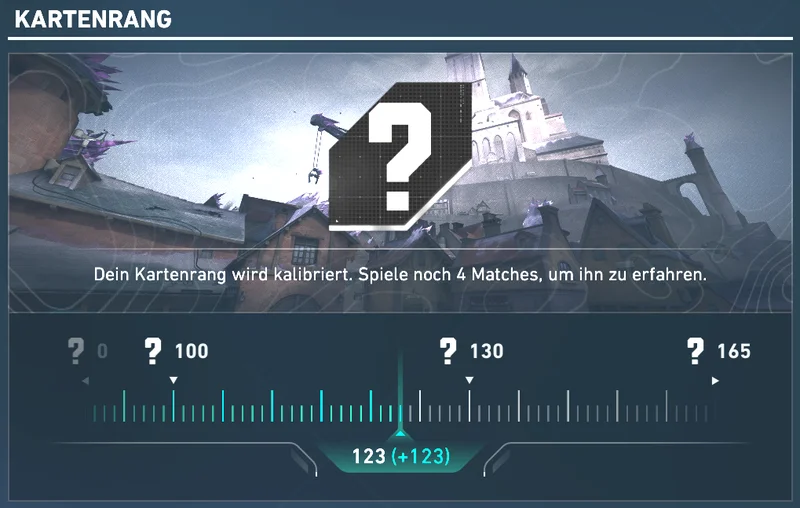
Map Rating can drop, too. Two calibration matches later, the client showed only 110 points (−17) on Summit after an 8–13 defeat with a Performance Score of 221 – with 2 matches left until the grade. A gain is shown in green, a loss in red. The grade markers at 0, 100, 130 and 165 were identical in the German and the English client.
This is the most common question – and the honest answer is: Riot does not say anything about it in the patch notes. Map Rating is described only as a value that tracks your proficiency over time and that only you can see. RR, rank and matchmaking are not mentioned.
Community analyses conclude that Map Rating has no effect on rank or RR. Your RR still depend on winning or losing and on the performance bonus, as shown in the new RR breakdown. Whether matchmaking uses map data internally is not publicly known. For you that means: treat Map Rating as a mirror, not as a points account. A C on a map does not cost you RR – it only shows you where you are currently leaving them behind.
At the same time as Map Rating, Riot rotated the map pool. Since Patch 13.08, Bind and Corrode are back in, Ascent and Split are out – in Competitive and Deathmatch. That leaves seven maps with a Map Rating right now: Abyss, Bind, Corrode, Haven, Lotus, Summit and Sunset. Click a card to open the matching map guide with callouts and strategies.
 AbyssMap guide & calloutsBack in 13.08
 BindMap guide & calloutsBack in 13.08
 CorrodeMap guide & callouts
 HavenMap guide & callouts
 LotusMap guide & callouts
 SummitMap guide & callouts
 SunsetMap guide & calloutsRotated out
 AscentNot in Competitive in Act 6Rotated out
 SplitNot in Competitive in Act 6
For your rating this detail matters: on the two returning maps, Bind and Corrode, everyone starts over at the same time, and most players have less routine there than on evergreens like Haven or Lotus. If you get into Bind and Corrode early, you gain a real edge. Ascent and Split, on the other hand, will not show up in Map Rating for now because they are not played in Competitive.
Corrode does not return unchanged. Riot adjusted the map in several places with Patch 13.08 – important for anyone playing their first rating matches there:
For your Map Rating that means some old Corrode habits from before 13.08 no longer work. Plan a few Unrated or custom rounds before you play Competitive there – Unrated does not count towards the rating, so it is the perfect place to experiment.
One of the four stats in Map Rating is the Performance Score, which Riot introduced with Patch 13.06 as the successor to ACS. It rates your individual performance in every match on a scale from 0 to 500 and decides MVP and scoreboard order in Competitive, Unrated, Swiftplay and Premier.
Since 13.06, according to Riot, three factors carry more weight in the Performance Score: damage, adjusted kills and adjusted deaths. The adjusted stats also include first bloods and first deaths. For your Map Rating this means: if you keep dying first on a map, you hurt not only your team's chance to win but also your Performance Score – two of the four pillars at once.
On the flip side, damage pays off even in lost rounds. If you tag an enemy and set up a trade for your team, that helps your score even if a teammate gets the kill. This logic helps most on maps where you feel uncomfortable: clean, damage-heavy rounds without an early death are worth more there than risky hero plays.

How the client breaks the value down: scroll down in the match details under “Performance” and Valorant shows a distribution curve from 0 to 500 with your value (221 in the example) and a per-round breakdown of eight stats: damage, adjusted kills, adjusted deaths, trades, assists, utility usage, plants and defuses. Each stat has an arrow that shows whether it pushed your score up or down. The curve's axis marks 250, 330 and 420; the areas from 330 and from 420 are highlighted in color. The client does not explain what exactly these areas mean – but the breakdown shows you very directly which lever to pull on a weak map.
The tips below are our recommendations based on the logic of the four stats. Riot has not published an official guide – but every point targets exactly the stats that go into the rating according to the patch notes.
The separate win rates are the most useful part of Map Rating because they show the problem at a glance. A few typical patterns and what they usually mean:
| Pattern | What it usually means | What to focus on |
|---|---|---|
| Attack clearly weaker | Executes feel uncoordinated, entries without trades | One default and one fast execute per site, utility before the peek |
| Defense clearly weaker | Too many early duels, retaking one by one | Fixed setups, play for information, retake together |
| Both sides even, low grade | Map knowledge or agent choice does not fit | Read the map guide, test agents from the Agent Select suggestion |
| High win rate, low Performance Score | You win with the team but contribute little | More damage, fewer early deaths, actively look for trades |
| High Performance Score, low win rate | Strong individual play, rounds still slip | Check communication, plant and retake decisions |
This table is a reading aid, not a diagnosis. It shows you where to start – you only find the real reason when you look at the situations yourself. That is exactly where looking at your deaths and kills on the real map pays off.
Besides Competitive, Premier also counts towards Map Rating. That is interesting for teams, because the players' individual grades show which maps the team as a whole is strong on. Since every member only sees their own rating, it is worth sharing grades within the team – for example with the planner's share text above.
It helps especially when preparing for Premier matches: if three out of five players have a C on a map, that is a clear sign of where joint practice should start. With the Map Strategy Board you can plan your setups for exactly that map.
Map Rating tells you where things go wrong – but not why. That is where the free Valorant-Spind app comes in. Its coach analyzes your real ranked matches and puts every kill and every death as a heatmap on the real map – switchable by side and weapon, with overpeek, trade and danger-zone analysis. Your deaths are translated into the map's official callouts, so you read “B Tower” instead of “somewhere top left”.
On top of that you get Riot's own Performance Score from your match data, your real RR breakdown and a 2D match replay that rebuilds your last 20 ranked matches kill by kill on the map. If your Map Rating on Haven is weak on defense, the heatmap shows the spots where you keep dying – and the replay shows how the enemies got there. The app runs locally on your Windows PC, needs no login and is free.
🗺️ Tip: A new duelist, Hush, arrives on October 27 – everything known so far is in the Hush guide.
| Claim | What the facts say |
|---|---|
| “Everyone can see my Map Rating.” | False. According to Riot, only you can see it. |
| “My old matches count too.” | False. Everyone starts at zero with 13.08, historical data does not count. |
| “Unrated wins raise my rating.” | False. Only Competitive and Premier count. |
| “400 points means S.” | Unproven. Riot has not published any grade thresholds. |
| “A bad rating lowers my RR.” | Not described that way by Riot. Community observations see no effect on rank or RR. |
| “A good match gains more than an old bad one costs.” | Basically true: according to Riot, recent matches count more than older ones. |
Map Rating is one of the most useful additions of the year because it answers a question that only third-party trackers could answer before: which maps am I losing my games on? Riot keeping the formula private is acceptable for a personal tool – the four inputs are known, and the separate win rates are the most valuable part anyway.
Still, keep two things in mind. First, the grade is a summary over many matches, not a verdict on a single game. Second, three of the four stats depend on your team's result. If you know that, you use Map Rating the right way: as a compass for practice, not as a reason to avoid a map. That is what the planner above is for – and for the next step, the heatmaps in the app's coach.
Riot Games: VALORANT Patch Notes 13.08 (Kenny “Karnifexlol” Cameron, October 13, 2026) · VALORANT Wiki: Patch Notes/13.08 · Riot Games: Patch Notes 13.06 (Performance Score) · esportnow.gg: Valorant Map Rating explained (observations from the client, marked as such). As of October 19, 2026.
A rating of how strong you are on a specific map. Since Patch 13.08 (October 13, 2026) every map gets a number from 0 to 500 and a grade from C to S. It applies to Competitive and Premier.
Riot names four inputs: your overall win rate, your attacker win rate, your defender win rate and your Performance Score on that map. Recent matches count more than older ones. Riot has not published the exact formula or the weighting.
According to the client you need five matches per map before a grade appears. Until then it says your rating is still calibrating. Matches played before Patch 13.08 do not count.
Only you. According to Riot, other players cannot see your Map Rating – neither in Agent Select nor on your profile.
In Agent Select, on the End of Game screen and in Career, where a navigation bar leads to Map Rating. You also find it in your match history: open a match, choose the performance tab on the left and the Map Rating panel appears on the right, with your points and the change from that match.
Riot does not say so in the patch notes. Map Rating is described as a personal overview. Community observations suggest it has no effect on rank or RR. Your RR still depend on wins, losses and the performance bonus.
The scale goes from C to S. According to the badge design, C, B and A each have three steps, while S has no further step. Riot has not published the point thresholds for each grade.
No. According to Riot, Map Rating only exists for Competitive and Premier.
Every map in the current pool: Abyss, Bind, Corrode, Haven, Lotus, Summit and Sunset. Ascent and Split are no longer in Competitive since Act 6.
No. The planner sorts the grades you enter from the game, shows your strongest and weakest map and suggests a training focus. Only Valorant itself calculates the official rating.
Because that map is still calibrating. The grade stays hidden until you have played five matches on it; the client tells you how many are left. Your points already count during calibration.
In the German client, Map Rating is called „Kartenrang“ and the Performance Score „Leistungsergebnis“.
Yes. After every match the panel shows the change, including losses – in the example on this page the value dropped from 127 to 110 points (−17) after a defeat. According to Riot, recent matches count more than older ones.
May I set a statistics cookie?
With your consent, Matomo (self-hosted in Germany, no sharing, IP shortened) uses a cookie to remember whether you come back – so I can see which pages really help. Without consent I keep measuring anonymously with no cookies at all. Change it any time via “Cookie settings” in the footer. Privacy policy
